
Infrastructure, tools, internal processes, and regulations change nonstop. Something that worked fine a year ago may already cause problems today, so many companies run IT audits to catch any risks before they snowball.
An IT audit gives you a clear look at your technology stack. Code quality, security setup, infrastructure, and workflows all come under review. Reports show IT and cybersecurity audits make up 20% of all audit plans, which puts them ahead of compliance or financial checks.
In this article, you’ll see why companies run audits, where teams often fail, and how to evaluate your IT audit readiness. We’ll also share our personal experience gained setting up processes that hold up well during audits.
Get ready for an IT audit with our compliance consulting for software companies.
Let’s connect and discuss your needs
What Is an IT Audit for Software Teams?
A technology audit is a structured review of a company’s technological infrastructure, policies, and operations.
An IT audit for software companies looks at systems, hardware, internal processes, and policies. The goal is to understand how your current setup works and whether it supports daily operations and long-term plans.
Audit helps you find weak points, fix security risks, replace outdated tools, and adjust your software. At the same time, it highlights the parts of your technology that already work well.
What does an IT audit cover?
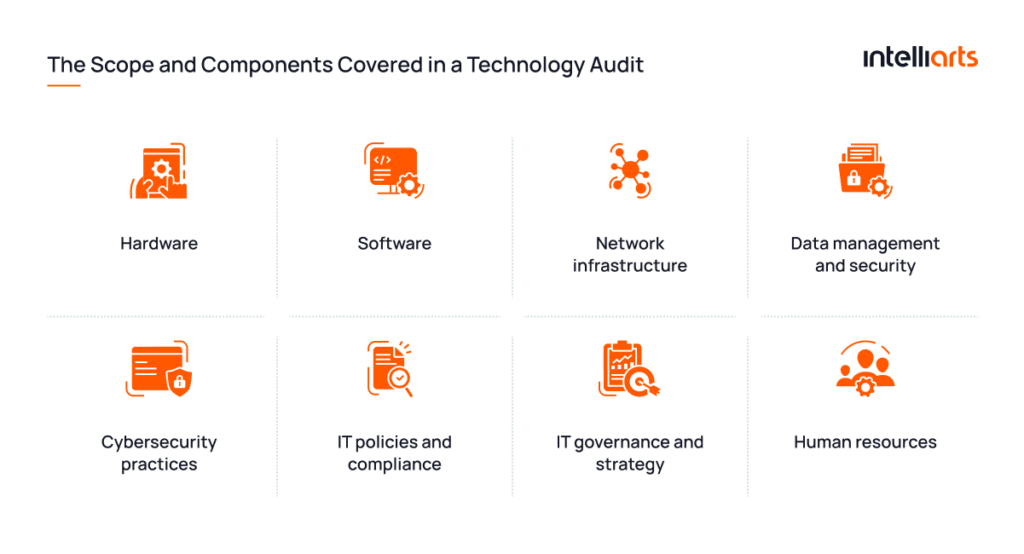
An IT audit reviews hardware, software, network infrastructure, data handling, cybersecurity, and other aspects. Here’s a more detailed breakdown:
- Hardware: Servers, computers, and network devices. Auditors check their condition, performance, and age.
- Software: Business applications, licenses, and updates. Review shows unused tools, security gaps, or outdated versions.
- Network infrastructure: Network design, configuration, and protection measures. Weak spots can slow systems or expose them to attacks.
- Data management and security: Data storage, backups, encryption, and access rules. Auditors also check compliance with privacy laws.
- Cybersecurity practices: Firewalls, antivirus tools, monitoring systems, and threat detection. Review shows how well your systems resist attacks.
- IT policies and compliance: Internal rules, procedures, and documentation. Auditors check whether they meet legal and industry requirements.
- IT governance and strategy: How IT decisions support business goals, budgeting, and long-term technology planning.
- Human resources: Skills, workload, and training of the IT team that maintains and supports your systems.
Why Do Software Companies Fail IT Audits?
Software companies fail IT audits because controls don’t work in practice. Often, teams delay preparation, then try to finish everything in the final weeks. At that point, the evidence feels incomplete, and written policies do not match the system’s actual behavior.
Here’re 3 most common reasons teams fail IT audits:
Lack of real control over systems
Many teams list security controls, such as access management, encryption, and data protection, but can’t prove they work in practice. Why?
- Access rights get outdated because they are not reviewed on a regular schedule
- System logs exist, but they do not contain enough detail to reconstruct actions
- Risk assessments remain generic instead of reflecting real threats
- Incident response plans are documented, but they are not tested in practice
That gap between “defined” and “working” is one of the top reasons audits fail.
Limited understanding of requirements
Standards like SOC 2 or ISO 27001 compliance for software companies may sound familiar, which often leads teams to assume they already meet expectations, even when the understanding stays too shallow.
For example, “data protection” stops at encryption, without covering storage, transfer, or access flow. Such a surface-level approach leaves holes, especially in SaaS, where tools and processes change all the time.
Rushed timelines and lack of ownership
When no one owns the process end-to-end, tasks move between teams, but don’t get you closer to the goal. Evidence is collected late, some controls stay unchecked, and others exist only on paper.
At Intelliarts, we deal with ISO 27001 audit preparation as part of our regular work. Each responsibility has a clear owner, so nothing falls through the cracks. When audit time comes, it becomes a validation of how we already work.
Looking for trusted technology consulting? Intelliarts experts are here to support you. Contact us.
What Auditors Look for in Software Systems?
IT auditors review your software to see whether it is secure, compliant, and reliable in real use. They want to know if you follow your own processes, update documentation, and properly protect sensitive data.
From our experience, there are 5 software audit preparation areas they focus on (and the types of questions you should be ready for):
Security and access checks
- Access control: Who has admin or elevated access, and when was the last time you reviewed that list?
- Authentication: Do all users use multi-factor authentication, or are there exceptions still active?
- Data protection: Where is sensitive data unencrypted in the system?
- Vulnerabilities: How quickly do you apply security patches after they are released?
- Third-party tools: Which external dependencies or services have not been reviewed for security in the last year?
Compliance and license tracking
- Regulations: What concrete evidence do you have that GDPR or SOC 2 requirements are met?
- Licenses: How do you verify that current software usage does not exceed purchased license limits?
- Inventory: When was the last full reconciliation between installed software and your official software inventory?
- Shadow IT: Do you know what tools teams use without official approval?
Code quality and system design
- Code quality: If a new developer joins tomorrow, how long until they can safely make changes here?
- Technical debt: Which parts of the system are too risky to modify without extra review?
- Architecture: Which component or service breaks first if traffic doubles?
- System links: Which services are so tightly coupled that a change in one requires updates in others?
Process and operational control
- Change flow: Can you walk through the last production change and who approved it?
- CI/CD: Are there any manual steps left before deployment?
- Documentation: When was system documentation last updated after a real change?
- Backups: When was the last successful restore test from backup?
- Recovery plan: Has the disaster recovery process been tested in a real or simulated failure scenario?
Data integrity and application controls
- Input checks: What prevents invalid, incomplete, or malicious data from entering the system?
- Processing rules: Where do you currently see mismatches or inconsistencies in processed data?
- Master data: Who owns key reference data, and how often is it reviewed?
- Audit logs: Can you trace a user action from start to finish without gaps?

How to Prepare for SOC 2 and ISO 27001 IT Audit?
Start by choosing the framework, scope, and evidence model. SOC 2 and ISO 27001 overlap in many areas, but they do not prove the same thing.
- ISO 27001 is a formal international certification for managing information security risks through an ISMS.
- SOC 2 (System and Organization Controls 2) is an audit report that checks how a company protects data and manages systems in five areas: security, availability, processing integrity, confidentiality, and privacy (defined by the American Institute of Certified Public Accountants).
Here’s a concise comparison of ISO 27001 and SOC 2 for SaaS companies:
| Aspect | SOC 2 | ISO 27001 | Key Difference |
|---|---|---|---|
| Scope & Adoption | Mostly used by the US and SaaS companies | Used worldwide across industries | SOC 2 is often buyer-driven; ISO 27001 is broader and more international |
| Output | Auditor’s attestation report | Formal certification | SOC 2 gives an auditor opinion; ISO 27001 gives a certificate |
| Approach | Checks trust service criteria and controls | Requires a full security management system (ISMS) | SOC 2 is control-focused; ISO 27001 is system- and process-oriented |
| Validity | Typically valid for 1 year | Valid for 3 years with annual audits | ISO 27001 certification process is longer compared to the SOC 2 reports |
SOC 2 audit preparation checklist: step-by-step guide
Generally, preparing for a SOC 2 means proving that controls are designed properly and, for Type II, that they worked consistently over time.
For SOC 2 readiness for startups, we usually recommend starting with security, availability, and confidentiality checks unless customers require more. This keeps the first scope realistic, while still covering what most SaaS buyers care about.
1. Define the audit scope and report type
Decide whether you need SOC 2 Type I or Type II:
- Type I checks controls at one point in time
- Type II checks whether they operate over a period (usually 3-12 months)
2. Confirm SOC 2 Type II requirements
Map your systems, data, and customer commitments to the trust service criteria. Security is the usual starting point, while availability, confidentiality, processing integrity, and privacy depend on your product and contracts.
3. Run a gap assessment
Compare your real workflows against SOC 2 requirements. Look at MFA, access reviews, change management, vendor reviews, logging, incident response, and backup testing.
Typical gaps to look for:
- Missing security policies
- No formal access control reviews
- Weak incident response process
- Lack of audit logs
4. Build and document policies
You’ll need clear, written policies such as:
- Information Security Policy
- Access Control Policy
- Incident Response Plan
- Change Management Policy
- Vendor Management Policy
- Data Classification & Handling
Importantly, these policies should reflect how teams actually work, so keep the language clear and practical. Simple way to think about it:
- Policies = intent (“how things should work”)
- Controls = execution (“how things actually work”)
- Evidence = proof (“how we know it works”)
“SOC 2 gets easier when evidence becomes part of delivery. If you need to stop engineering work for two weeks to collect proof, the process is not audit-ready yet.” — Data engineer at Intelliarts, with 20 years in DevOps/MLOps.
5. Implement technical and operational controls
Auditors focus heavily on technical controls. Here’s a short SOC 2 controls checklist:
- Multi-factor authentication (MFA)
- Role-based access control (RBAC)
- Logging and monitoring (SIEM or logs)
- Encryption (at rest and in transit)
- Backup and disaster recovery
- Operational Controls
- Employee onboarding/offboarding
- Security awareness training
- Vendor risk reviews
- Regular access reviews
6. Collect evidence continuously
For Type II, evidence cannot appear the week before the audit. You need dated access reviews, tickets, logs, training records, incident records, and screenshots over time.
7. Run a readiness assessment
Treat this as a mock audit. We usually try to recreate the real process as realistically as possible: ask questions, request proof, and check how fast our team can find evidence.
8. Choose an auditor and manage the process
Pick a CPA firm with SOC 2 experience. Assign one internal owner to coordinate requests so answers stay consistent.
Get ready for your SOC audit with Intelliarts.
Let’s define your next steps together
ISO 27001 audit checklist: preparation steps
ISO 27001 audit preparation is broader. You’re not only proving controls; you’re proving that the organization manages information security through a structured ISMS (Information Security Management System).
A practical ISO 27001 cluster should cover scope, risk assessment, Statement of Applicability, ISO 27001 controls, internal audit, management review, and evidence.
-
Lock the ISMS scope
Define which products, systems, teams, cloud accounts, and third-party tools are in scope. If a tool stores or processes customer data, do not ignore it. A typical scope may look like this:
- Products and services
- Cloud environments (AWS, GCP, Azure)
- Internal tools (GitHub, Jira, Notion, etc.)
- Systems storing customer or production data
- Third-party services with data access
“From our experience, teams often miss old environments, test systems, or SaaS tools that still store sensitive data. Auditors usually find these first, so it’s important to keep a complete and up-to-date inventory of all systems.” — Alexander Barinov, a Managing Partner at Intelliarts, with over 10 years of experience in software solutions.
2. Rebuild the risk register from the current reality
Go system by system and describe risks in practical terms: what can fail, who owns it, and what control reduces the risk today.
Risk registers are often written once and then left unchanged, even when infrastructure or product setup changes. Auditors check whether risks match the current system, so historical documentation won’t work.
3. Prepare the Statement of Applicability
SoA connects ISO 27001 controls to your actual environment. It should clearly show:
- Which controls apply (and which don’t)
- Why the decision was made
- Where the control exists in practice
Note that implemented controls should match processes, tickets, or technical proof behind them.
4. Align policies with operations
Check how teams operate in daily work and how policies describe it. Policies that don’t match reality may cause extra questions. Areas to verify:
- Access approvals (ticket, Slack request, or manual approval)
- Incident reporting and tracking flow
- Vendor onboarding and approval steps
- Backup execution and restore testing
5. Make each control proof-ready
Every control needs evidence: prepare screenshots, logs, reports, tickets, approval records, or review notes.
6. Run an internal audit and management review
ISO 27001 for software companies expects continuous improvement. Internal audit checks whether controls work as described and whether evidence exists for each one. Management review covers:
- Open risks and incidents
- Audit findings and remediation status
- Security performance signals (access reviews, incidents, training completion)
7. Close gaps based on impact
Some areas usually carry higher audit risk:
- Access control (production and sensitive data access)
- Logging and monitoring (visibility into system activity)
- Incident response (response time and tracking)
- Cloud configuration (public access, misconfigurations)
- Backup and recovery testing (actual restore capability)
We recommend fixing real security issues before updating documentation, since paperwork alone won’t meet audit expectations if the controls are still weak.
IT Audit Checklist for Development Teams
We prepared an actionable checklist you can use when getting ready for an IT audit. Download the PDF here.

How AI and LLM Features Change IT Audit Scope?
If you work with AI or LLM systems, include them in your IT compliance audit scope when they touch customer data, production workflows, decisions, or internal knowledge bases.
For AI software, auditors may ask:
- What data goes into the model or prompt?
- Can sensitive information appear in outputs?
- Who can access prompts, model logs, embeddings, and evaluation datasets?
- How do you test for prompt injection, insecure output handling, and data leakage?
- What happens if the model gives a wrong or unsafe answer?
AI and LLM governance is getting more important as AI systems move into production use. Compliance frameworks are starting to treat AI as a bigger risk area, separate from the general software controls.
For example, the EU AI Act uses a risk-based model, the NIST AI Risk Management Framework defines how to govern and measure AI risks, and OWASP highlights common LLM security issues like prompt injection, data leakage, insecure outputs, and supply chain risks.
What does it mean for software teams?
For teams going through the ISO 27001 or SOC 2 audit process, AI usage means auditors expect the same level of control over AI systems as they expect over infrastructure or production environments.
From our experience, we needed to prove a few key things during audits:
- Clear data boundaries for AI inputs and outputs, including what data can enter the model and what can come out
- Restricted access to model-related data like prompts, logs, embeddings, and evaluation datasets
- Evidence that we test AI behavior for security issues such as prompt injection, insecure output handling, and data leakage
- A defined process for fixing incorrect or unsafe model outputs, especially when AI affects decisions or customer-facing results
How Does Intelliarts Build Audit-Ready Software Systems?
Audit readiness shows in how your systems work every day. From what we’ve learned, strong audit readiness is built around tight processes, clear ownership, and proof you can show immediately. Here’s how we do it.
Secure SDLC and security built into daily work
Secure Software Development Life Cycle (SDLC) means security is a part of every stage of development. You define security requirements during planning, include them in design, and validate them during development and testing.
NIST guidance also points to this approach, where security becomes part of the lifecycle instead of a separate activity at the end.
How we do it:
- Add security requirements to tickets before work starts
- Discuss basic risks during design and development
- Review and check security aspects in pull requests
- Include input validation, authentication, and data exposure tests in regular testing
CI/CD security controls that show the real picture
Your DevOps pipeline should tell the story of every production change: who made a change, what tests ran, what passed or failed, and who approved the release. Auditors often focus on this traceability during reviews.
How we do it:
- Protect the main and production branches and require approvals before merges
- Block direct pushes to production branches
- Run automated tests and security scans on every change
- Log commits, authors, test results, and approvals for each deployment
- Keep full release history available for audit checks
Code review processes that hold under pressure
Code reviews often weaken when teams rush delivery. We’ve been there: reviews get skipped, and small issues slip through. Now, for us, reviews are non-negotiable, and they tie directly to SOC 2 controls.
How we do it:
- Require at least one approval for every change
- Require two approvals for sensitive changes
- Enforce review rules directly in repository settings
- Review security, logic, and data handling in every pull request
Logging that supports investigation needs
Audit logs should help teams reconstruct login, access changes, configuration updates, failed jobs, deployments, and data exports. If logs exist but no one can search them, they won’t help much during an IT audit.
How we do it:
- Log key events such as authentication, access changes, deployments, configuration updates, data exports, and failed operations
- Centralize logs in one searchable system
- Define retention rules and follow them consistently
- Test log search during internal checks to confirm fast access to answers
Access control that stays accurate over time
In audits, access control usually fails because no one maintains it – people change roles, but permissions stay. To stay prepared for an IT compliance audit, you should review access regularly, use SSO/MFA, and document approval flows.
How we do it:
- Run regular access reviews and remove unused permissions
- Set expiration dates for temporary access
- Apply single sign-on and multi-factor authentication
- Require documented approval for access changes
- Compare active users with current roles during periodic checks
SDLC, DevOps, and security working as one system
Audit-ready systems don’t split SDLC, DevOps, and security into separate tracks. Controls should link directly to daily work: code changes, deployments, infrastructure updates, vendor reviews, and incident response. That’s what supports SOC 2 and ISO 27001 readiness most.
How we do it:
- Connect tickets, pull requests, CI/CD runs, and deployments into one chain
- Link each production change to a requirement and approval
- Include test results and security checks in the same pipeline
- Keep full traceability from idea to production release
How to Audit Your Development Infrastructure?
To audit your development infrastructure, track the process from code commit to production and then to recovery. You can follow this plan:
1. Review cloud environments
Start with cloud infrastructure security. Your goal is not only to know what exists and where, but to prove who owns it and how it’s protected. Check:
- Cloud accounts, subscriptions, and projects
- IAM roles and admin access
- Network rules and exposed services
- Encryption for databases, storage, and backups
- Security groups, firewalls, and public endpoints
- Cloud audit logs and retention
2. Check the DevOps pipeline
Your pipeline is one of the first places auditors look because it controls how code reaches production. If production changes happen outside the pipeline, you should also document the exception. Review:
- Branch protection rules
- Required code reviews
- Build and test results
- Security scans
- Deployment approvals
- Emergency change process
- Artifact storage and versioning
3. Audit secrets management
Very often, secrets are spread across environment files, CI/CD variables, local machines, and outdated scripts. Look at:
- Storage locations for secrets (vault vs environment files, CI/CD variables, local machines, old scripts)
- Vault usage and access controls
- Rotation schedule and enforcement
- Scope of access by environment and role
- Secret cleanup when credentials are no longer needed
- Exposure risks in logs, builds, and error outputs
4. Test vulnerability management
Auditors want proof that teams find, prioritize, assign, and fix vulnerabilities. A strong vulnerability management process includes scans, severity rules, remediation SLAs, tickets, retesting, and tracked exceptions with clear owners.
5. Validate logs, monitoring, and alerts
Make sure your audit logs cover authentication, access changes, deployments, privilege escalation, system errors, data exports, and suspicious activity.
Also, check whether alerts go to the right people. A perfect alert that no one reads is not a working control.
6. Test backups and recovery
Backups are not enough. You need to restore tests. Document RTO, RPO, backup schedule, backup encryption, restore results, and lessons learned. Auditors care less about what the policy says and more about the last successful restore.
Intelliarts can review your SDLC, DevOps pipeline, cloud setup, and evidence. Let’s discuss.
Which Mistakes in IT Audit Preparation Should You Avoid?
Nobody enjoys an audit, but it gets easier when you prepare early and keep your setup clear and documented. Start with the common mistakes that usually cause issues. Avoid them upfront to reduce findings, delays, and rework:
- Not setting the scope upfront: If the scope is unclear, auditors expand requests across more systems and evidence. Define boundaries before the audit starts.
- Writing policies no one follows: Policies that don’t match real workflows create gaps. Keep them practical and align them with daily engineering work.
- Waiting too late to collect evidence: Evidence needs time coverage, not last-minute snapshots. Late screenshots can’t prove controls worked over time.
- Over-documenting and under-organizing: Large document dumps slow audits down. Auditors expect clear, structured, control-mapped evidence.
- Not preparing the team: Engineers, DevOps, support, and leadership should understand the scope and typical questions to keep answers consistent.
- Treating auditors like adversaries: Auditors only assess controls, so share context, answer directly, and avoid defensive communication.
- Poor evidence presentation: Raw logs or screenshots without context create confusion. Highlight relevant sections and explain what each item proves.
Should You Prepare Internally or Work with a Partner?
Prepare internally if your team has audit experience, enough time, and clear ownership. Work with a partner if this is your first SOC 2 or ISO 27001 audit, your product is complex, or the timeline is tight.
| Option | Works best when | Watch out for |
|---|---|---|
| Internal preparation | Your team has audit experience and existing controls | Blind spots, slow evidence collection, unclear ownership |
| External partner | You’ve never had an audit before/ your internal team is still small | Partner still needs your team’s input and system knowledge |
| Hybrid approach | Your team owns implementation, and partner reviews gaps | Requires strong coordination |
A partner won’t “do compliance” for you. But they can show where audits usually go wrong: weak audit logs, messy access rights, unclear incident response, missing evidence, and gaps in cloud infrastructure security.
For many teams, the best setup is hybrid. Internal teams keep ownership, while an audit readiness services provider validates scope, reviews evidence, and helps close gaps before auditors arrive.
Final Take
IT auditing helps you understand the current state of your systems, meet regulatory requirements, and find areas that need improvement. While internal audits are useful, an external audit gives you an independent, professional assessment.
Request a tech audit from Intelliarts, a trusted provider of AI/ ML development and technology consulting. With more than 27 years on the market, we can provide guidance, give actionable advice, and share personal experience going through an audit. Let’s connect and discuss our next steps.
FAQ
1. What is an IT audit?
An IT audit is a structured review of a company’s technology systems, processes, policies, and controls. For software teams, it usually covers access management, cloud infrastructure, code changes, audit logs, data protection, incident response, and compliance evidence.
2. What is a SOC 2 audit?
A SOC 2 audit evaluates controls at a service organization, usually around security, availability, processing integrity, confidentiality, and privacy. It is especially common for SaaS companies that need to prove security and operational control to enterprise customers..
3. How to prepare for an IT audit?
Start by defining scope, mapping data flows, assigning control owners, reviewing policies, checking access rights, validating audit logs, testing backups, and collecting evidence. Then run a readiness assessment before the external audit begins.


![Top MLOps Tools in 2026 and Their ROI [Based on Real Projects]](https://intelliarts.com/wp-content/uploads/2026/08/ChatGPT-Image-23-июн.-2026-г.-11_16_54-1.webp)