

Knowledge is of actual business value when both workers and customers can access and use it in a time-effective manner. Yet in many companies, critical answers sit across help centers, PDFs, tickets, internal wikis, databases, and product documentation. This is one reason AI adoption keeps accelerating.
McKinsey reported in 2025 that 88% of organizations used AI in at least one business function, up from 72% in early 2024. At the same time, Salesforce’s 2025 State of Service report says service teams estimate AI already handles 30% of cases, with 50% expected by 2027.
This guide explains how to build an AI knowledge base chatbot reinforced with Retrieval-Augmented Generation (RAG). It also indicates what tools and technologies to use and what the common challenges are, as well as brings up real-world success stories.
TL:DR
- AI knowledge base chatbots combine LLMs with RAG to answer questions using company-approved data.
- They retrieve relevant information from help centers, PDFs, wikis, tickets, databases, and product docs before generating a response.
- The core architecture includes data ingestion, chunking, embeddings, a vector database, a retriever, and an LLM.
- RAG is great for fine-tuning because it keeps answers connected to current business knowledge.
- The strongest use cases include customer support, internal knowledge search, HR assistance, developer documentation, and workflow automation.
What is an AI knowledge base chatbot?
An AI knowledge base chatbot is a conversational system that retrieves information from structured or unstructured data sources and generates context-aware answers using LLMs.
By and large, AI knowledge chatbots are used to help users find reliable information across the following sources of information:
- Help centers
- Internal wikis
- Product documentation
- Databases
- PDFs
- Support tickets
Traditional chatbots usually depend on scripted flows, keyword matching, or predefined FAQ logic. This works for simple requests, but it becomes limited when users ask questions that require context from several documents.
A RAG chatbot addresses this limitation by combining retrieval with response generation. First, the system searches the connected knowledge base and selects the most relevant content. Then, the LLM uses that context to generate a direct answer based on approved company information.
Core capabilities usually include:
- Retrieval: finding relevant information across connected data sources.
- Reasoning: interpreting user intent and connecting related context.
- Contextual responses: generating answers that match the user’s question and available evidence.
- Source grounding: reducing unsupported answers by relying on retrieved content.
For enterprises, an AI knowledge base chatbot becomes a practical knowledge access layer. It can support customers, employees, developers, HR teams, and operations staff without forcing them to search across disconnected systems manually.
“The strategic value of an AI chatbot emerges when it’s already a part of an organization’s knowledge infrastructure, making information easier to access and govern.” — Volodymyr Mudryi, a data scientist and ML expert at Intelliarts.
Why build a knowledge base chatbot instead of using traditional search?
A RAG chatbot is most useful when users need a direct answer grounded in company knowledge and supported by relevant information from approved sources.
A conversational AI knowledge base handles this through retrieval before generation. It searches approved sources first, such as help center articles, product documentation, internal policies, or support tickets. Then, the LLM uses that context to generate a focused answer.
This approach helps teams solve the common knowledge access issues:
- Poor search relevance. An AI chatbot retrieves content based on semantic meaning, not only exact keywords.
- Lack of context awareness. A smart assistant connects the user’s question with relevant documents and business rules.
- Manual information retrieval. AI reduces the need to open several files, tabs, or systems.
- Inefficient support workflows. A RAG chatbot helps agents answer repetitive questions faster and more consistently.
Important note. Intelliarts’ experience shows that having both traditional manual access to the knowledge base and a RAG-enabled chatbot is even more beneficial than relying on only one method.
Looking to leverage industry-leading AI expertise?
We specialize in AI, ML, RAG, big data, and custom software solutions for distinct business needs.
Request RAG development services
How does an AI knowledge base chatbot work?
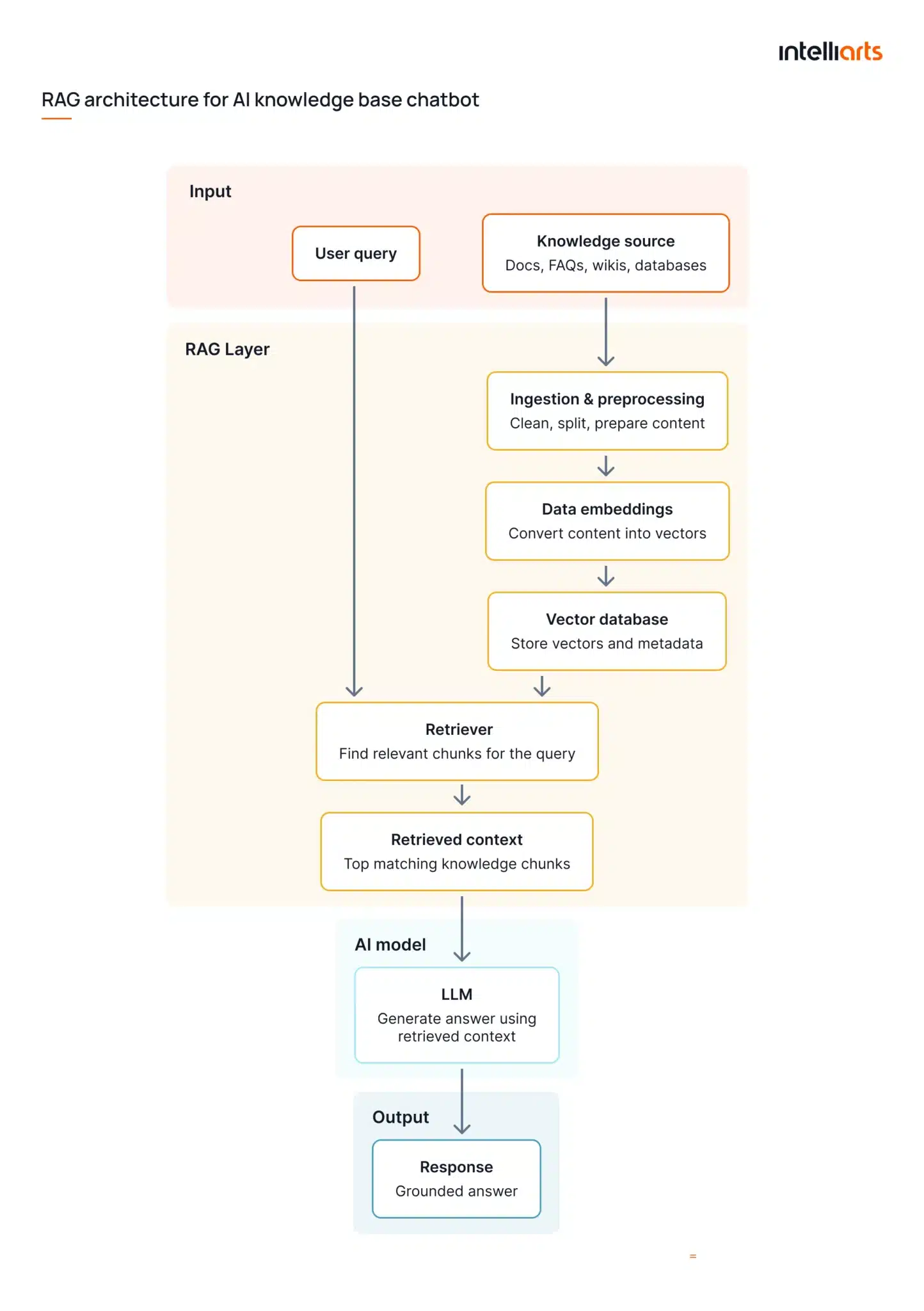
An AI knowledge base chatbot works by retrieving relevant information from connected data sources and using that context to generate an answer with an LLM. In most enterprise use cases, this workflow is based on retrieval-augmented generation, which helps the system produce answers grounded in approved company knowledge.
The workflow usually includes these stages:
- Data ingestion: the system collects content from sources such as product documentation, FAQs, internal wikis, support tickets, or databases.
- Chunking and preprocessing: long documents are split into smaller text sections. The content is also cleaned, deduplicated, and prepared for more accurate retrieval.
- Embedding generation: each text chunk is converted into embeddings, which represent the meaning of the content in numerical form.
- Vector database storage: embeddings are stored in a vector database, where the system can search for semantically relevant content.
- Query retrieval: when a user asks a question, the retriever finds the most relevant chunks based on meaning and context.
- LLM response generation: the selected context is passed to the LLM, which generates a clear answer based on retrieved information.
See a simplified RAG architecture for an AI knowledge base chatbot split into a workflow from user input to RAG-driven AI output in the infographics below:
RAG vs fine-tuning: What’s the best approach?
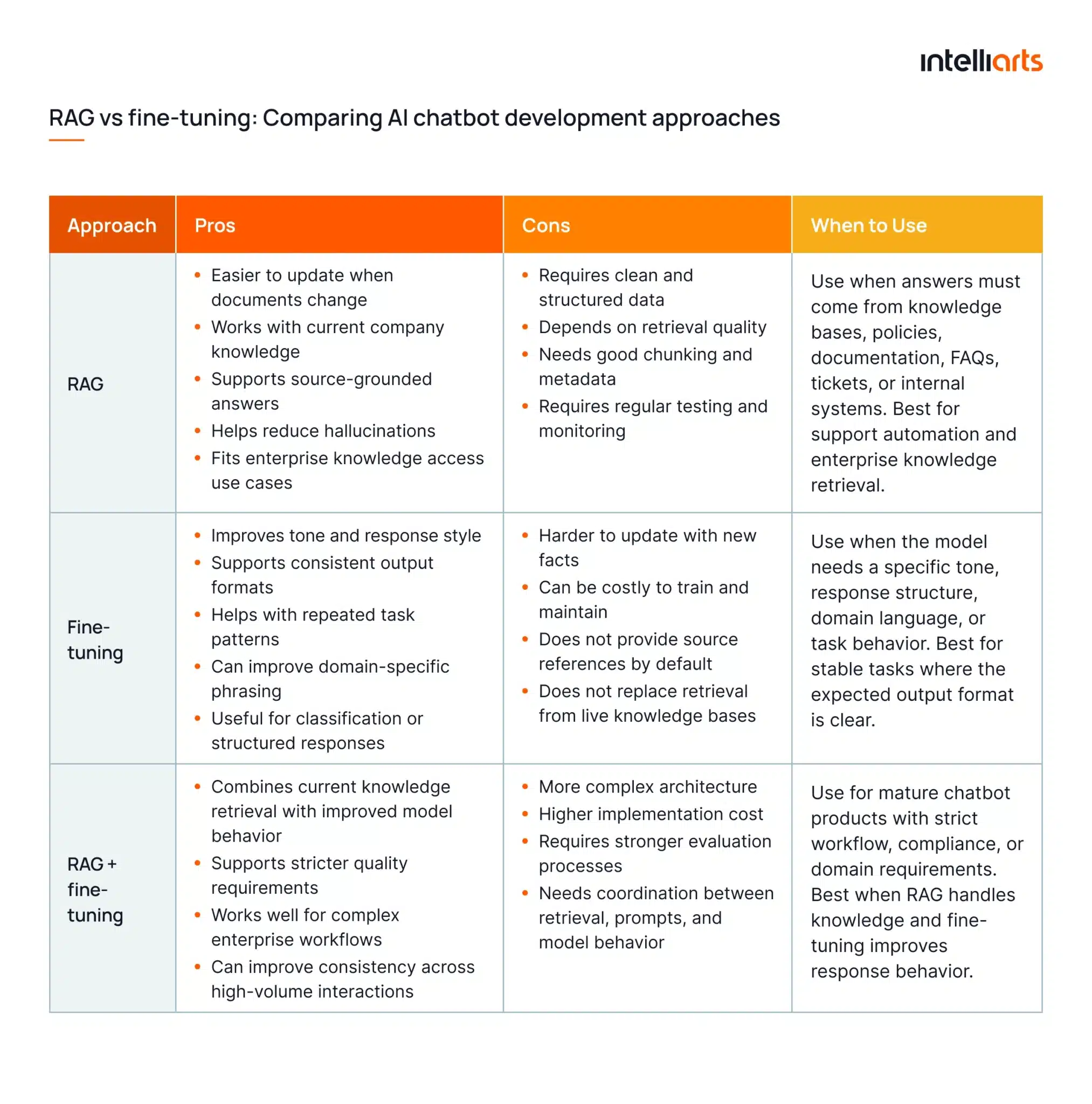
For most AI knowledge base chatbot projects, RAG is the better starting point because it connects the chatbot to current company knowledge without model retraining. Fine-tuning can help in specific cases, especially when the chatbot needs a controlled tone, format, or task behavior.
RAG works well when answers must come from help centers, policies, product documentation, internal wikis, or support tickets. LLM fine-tuning is more useful when the model needs to follow a specific response pattern, classify requests, or use domain-specific phrasing more consistently.
Looking for a technical consultation on RAG development? Don’t hesitate to reach out.
What tools and technologies do you need?
An AI knowledge base chatbot depends on how well its technical stack supports the RAG workflow for an LLM. The large language model may generate the final response, but answer quality also depends on retrieval, data preparation, access control, and integrations with real company systems.
For a practical implementation, the stack usually includes the following four main layers:
- LLM for answer generation
Such LLMs provide responses as per the retrieved context based on users’ inquiries. API-based models are useful for faster deployment because teams do not need to manage model hosting, scaling, or infrastructure updates themselves.
Common LLM providers include:
- OpenAI for strong general-purpose reasoning and fast implementation
- Anthropic for long-context workflows and enterprise-grade response generation
- Google Gemini for teams already building on Google Cloud
- Azure OpenAI for companies that need Azure-native deployment and governance
- Open-source models, such as Llama or Mistral, for private hosting, cost control, or deeper customization
Open-source LLMs for customer service can fit projects with stricter requirements for private hosting, data control, or domain-specific customization. However, they usually require more internal MLOps and infrastructure support.
- Vector database for retrieval
A RAG chatbot needs a vector database to find relevant content by meaning. This helps the chatbot match questions with document sections, even when users do not repeat the same terms used in the original source.
Common vector database options include:
- Pinecone for managed vector search
- Weaviate for semantic search and metadata support
- FAISS for lightweight local search
- Milvus for larger-scale vector search infrastructure
- Qdrant for open-source deployment and flexible filtering
This layer matters because retrieval quality directly affects answer quality. Poor chunking, weak metadata, or irrelevant matches can lead to vague answers, even when the LLM itself is strong.
Explore automated data extraction in great detail on the example of ChatGPT AI in another blog post by Intelliarts.
- Backend layer for orchestration
The backend connects the workflow. It handles ingestion, chunking, embeddings, retrieval, prompt assembly, authentication, logs, and feedback.
Teams often use:
- LangChain for chaining retrieval, prompt engineering, tools, and LLM calls
- LlamaIndex for document ingestion and document indexing, as well as RAG pipeline development
- FastAPI for Python-based backend APIs
- Node.js for web application logic and real-time interfaces
- Custom services when the chatbot needs complex permissions, workflows, or integrations
This layer also controls business logic. For example, it can check user permissions before retrieval, apply metadata filters, route questions by topic, and store feedback for later improvements.
- Integrations for business value
The chatbot becomes useful when it connects to real knowledge sources, such as documentation, tickets, files, CRM records, databases, or internal systems. Without integrations, the chatbot may produce fluent answers but miss operational context.
Common integrations include:
- Confluence and SharePoint for internal documentation
- Google Drive and OneDrive for business files
- Zendesk, Intercom, Freshdesk, and Jira Service Management for support data
- Salesforce and HubSpot for CRM context
- PostgreSQL, MySQL, MongoDB, and Snowflake for structured business data
- Slack and Microsoft Teams for employee access
- Internal APIs for product, billing, account, or workflow data
For enterprise chatbot implementation, integrations should also respect permissions. A chatbot connected to HR, finance, or customer records must retrieve only the information each user is allowed to access.
Interested in improving your AI chatbot’s accuracy by 40%?
We describe how to drive efficiency with RAG & LLMs in our recent research.
Read white paper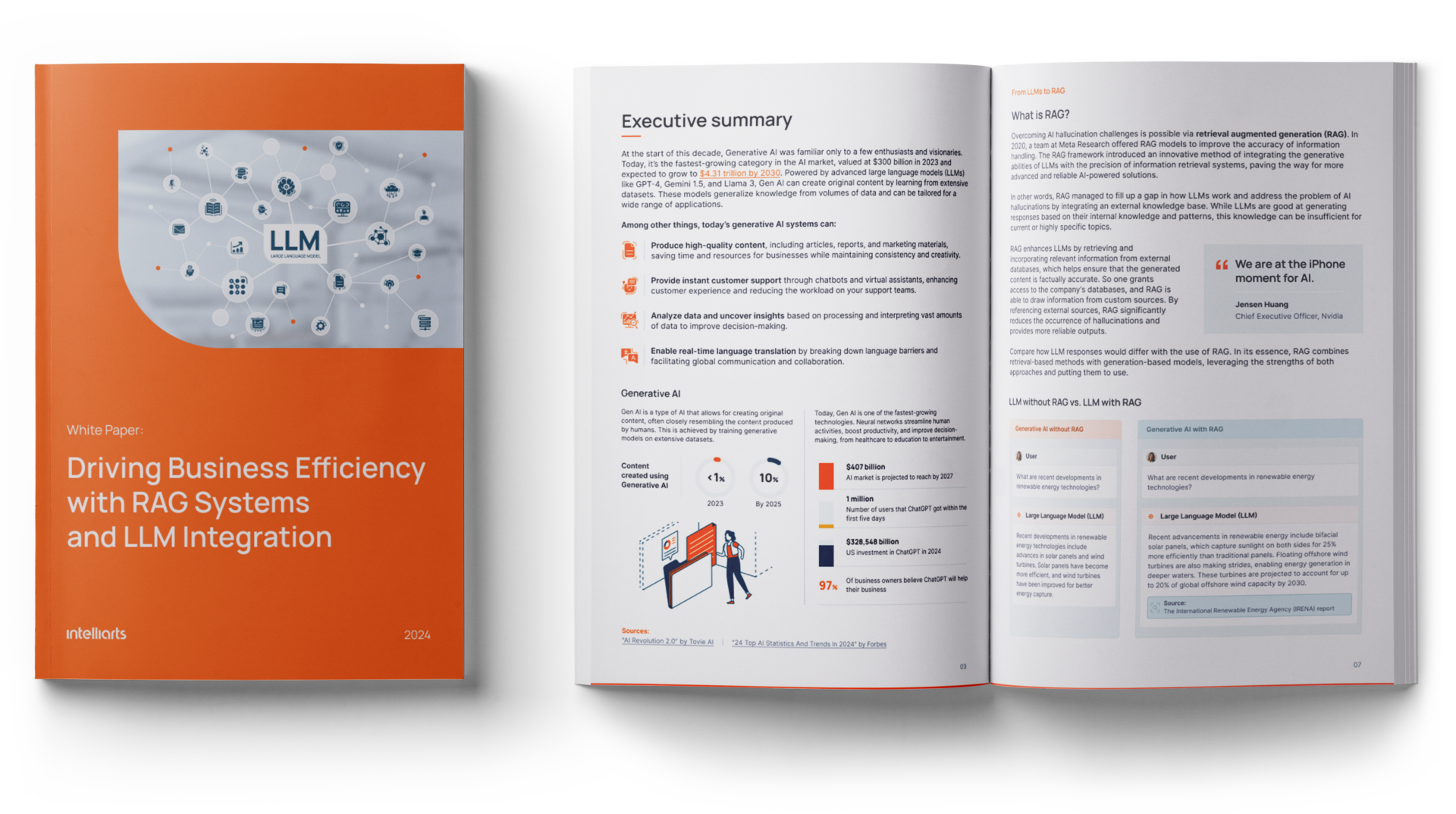
Step-by-step: How to build an AI knowledge base chatbot
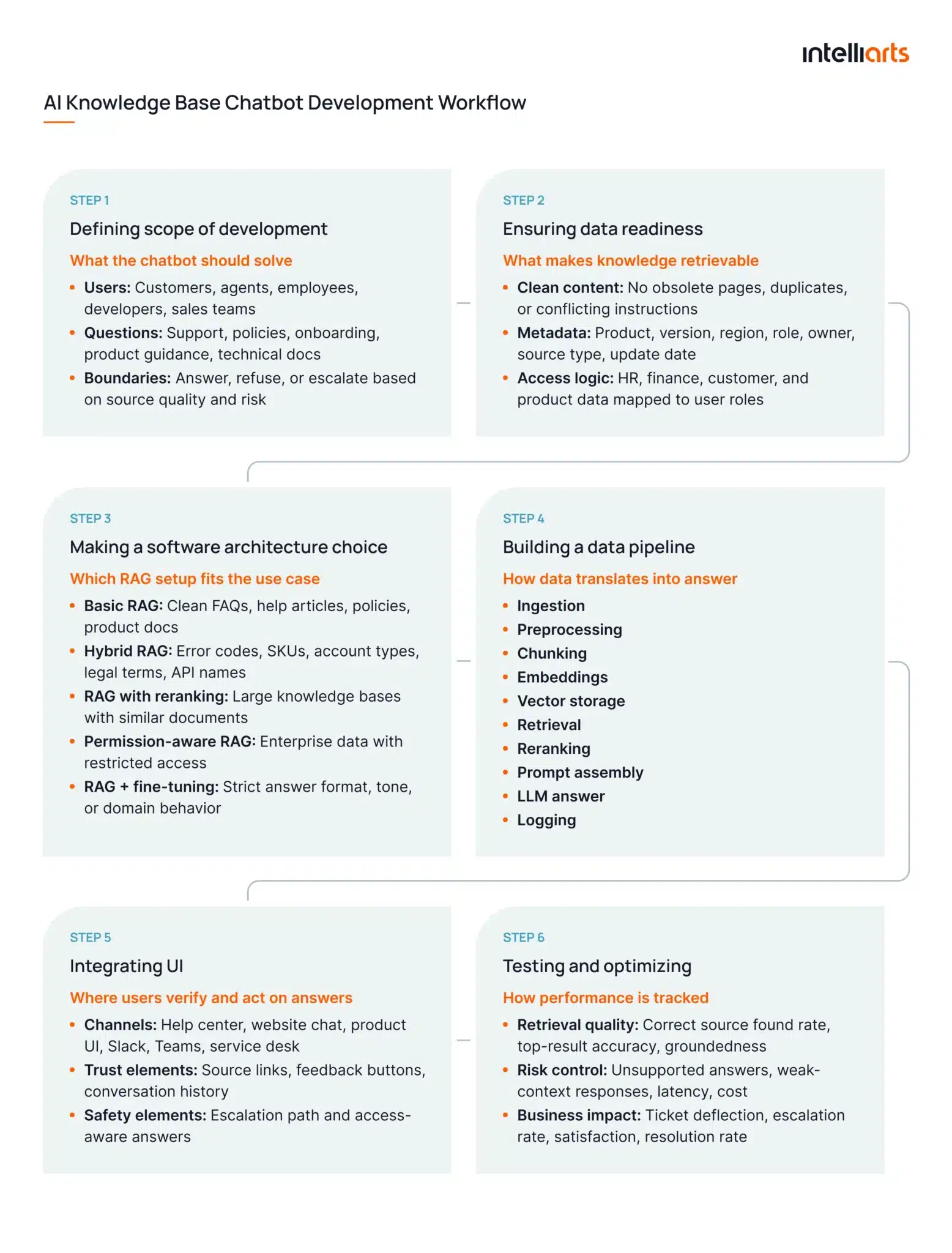
Building a knowledge base chatbot should begin with a business problem and then move into architecture. Here’s a simplified step-by-step plan:
1. Define the use case
Good starting points include customer support automation, internal policy search, developer documentation, onboarding, or product troubleshooting.
Before development starts, define:
- User group: Customers, support agents, employees, developers, or sales teams
- Question types: Troubleshooting, policy lookup, product guidance, onboarding, or technical documentation
- Source of truth: Help center articles, internal wikis, PDFs, tickets, databases, or APIs
- Answer boundaries: Questions the chatbot can answer, refuse, or escalate
- Success criteria: Faster resolution, fewer repetitive tickets, higher answer accuracy, or reduced manual search time
2. Prepare the data
As per the Garbage-in-Garbage-Out (GIGO) rule, a RAG chatbot depends on the quality of the knowledge it retrieves.
Prepare the data by checking:
- Content quality: Remove obsolete pages, duplicates, and unclear instructions
- Document ownership: Assign owners for policies, product docs, and support articles
- Metadata: Add product, version, region, department, role, source type, and last update date
- Access rules: Define which users can retrieve HR, finance, customer, or internal product data
- Update frequency: Decide whether sources should sync daily, weekly, or after every content change
For technical teams, this stage also includes chunking. Each document should be split into sections that are small enough for precise retrieval, but large enough to preserve a useful context window
Learn about data preparation in Machine Learning in another one of our blog posts.
3. Choose the architecture
For most knowledge base chatbot development projects, RAG is the best starting architecture because it lets the chatbot answer from the current sources. Your options here are the following:
- Basic RAG: Best for clean FAQs, help center articles, policies, and product documentation.
- Hybrid RAG: Best when exact terms matter, such as error codes, product names, SKUs, account types, legal terms, or API names. It combines semantic search with keyword search.
- RAG with reranking: Best for large knowledge bases with many similar documents. The retriever finds possible matches, then a reranker sorts them before the LLM receives context.
- Permission-aware RAG: Best for enterprise use cases. The system checks user permissions before retrieval, so restricted information does not enter the prompt.
- RAG plus LLM fine-tuning: Best when retrieval already works well, but the chatbot needs a stricter answer format, tone, or domain-specific response pattern.
4. Build the pipeline
A practical first version of the pipeline should use a limited document set and a real question set from support tickets, search logs, helpdesk requests, or internal chats.
A good data pipeline for an AI chatbot typically includes:
- Ingestion: Pulls content from approved documents, databases, and apps
- Preprocessing: Cleans text, removes duplicates, and applies metadata
- Chunking: Splits content into retrievable sections
- Embedding generation: Converts text chunks into vectors
- Vector storage: Stores embeddings with metadata and source links
- Retrieval: Finds relevant chunks for each user query
- Reranking: Prioritizes the strongest matches when needed
- Prompt assembly: Combines system instructions, user query, and retrieved context
- LLM generation: Produces the final answer
- Logging: Stores queries, retrieved chunks, answers, errors, and feedback
If the retrieved context is weak, the chatbot should say that it cannot answer from available sources and offer escalation.
5. Integrate the UI
The UI should fit the place where users already ask questions. For customers, this may be a help center widget, website chat, or in-product assistant. For employees, it may be Slack, Microsoft Teams, an internal portal, or a service desk interface.
A good chatbot UI should include:
- Clear input field
- Source links
- Feedback buttons
- Escalation path
- Conversation history
- Access-aware results
6. Test and optimize
Intelliarts’ experience with custom AI projects shows that post-production support and optimization heavily rely on concrete metrics. In the case of AI knowledge chatbot development, the usual technical metrics are the following:
- Correct source found rate: How often the chatbot retrieves the document that contains the right answer
- Top-result accuracy: How often the first retrieved chunk is useful
- Answer groundedness: Whether the final answer is supported by the retrieved context
- Unsupported answer rate: How often the chatbot answers without enough evidence
- Response latency: How long users wait for an answer
- Cost per answer: Model, retrieval, storage, and infrastructure cost per interaction
At the same time, it’s also important to track business metrics such as:
- Ticket deflection rate: How many support requests the chatbot resolves without human help
- Escalation rate: How often users still need an agent
- User satisfaction: Whether users rate answers as helpful
- Repeat question rate: Whether users ask the same question again
- Average handling time reduction: How much time support or operations teams save
- Resolution rate: How often users solve their issue after using the chatbot
Technical optimization usually happens in the retrieval layer. At the same time, meeting business metrics requires continuous maintenance and regular updates to the solution over time.
How do you train and improve a knowledge base chatbot?
Reflecting on the need to test and improve a chatbot, as mentioned above, you may start wondering how to do so. An expert AI development team like Intelliarts uses a combination of strategies in the production and post-production steps to obtain measurable improvements in technical performance as well as in business metrics.
See the infographic on the general process of training and improving a knowledge base AI chatbot below:
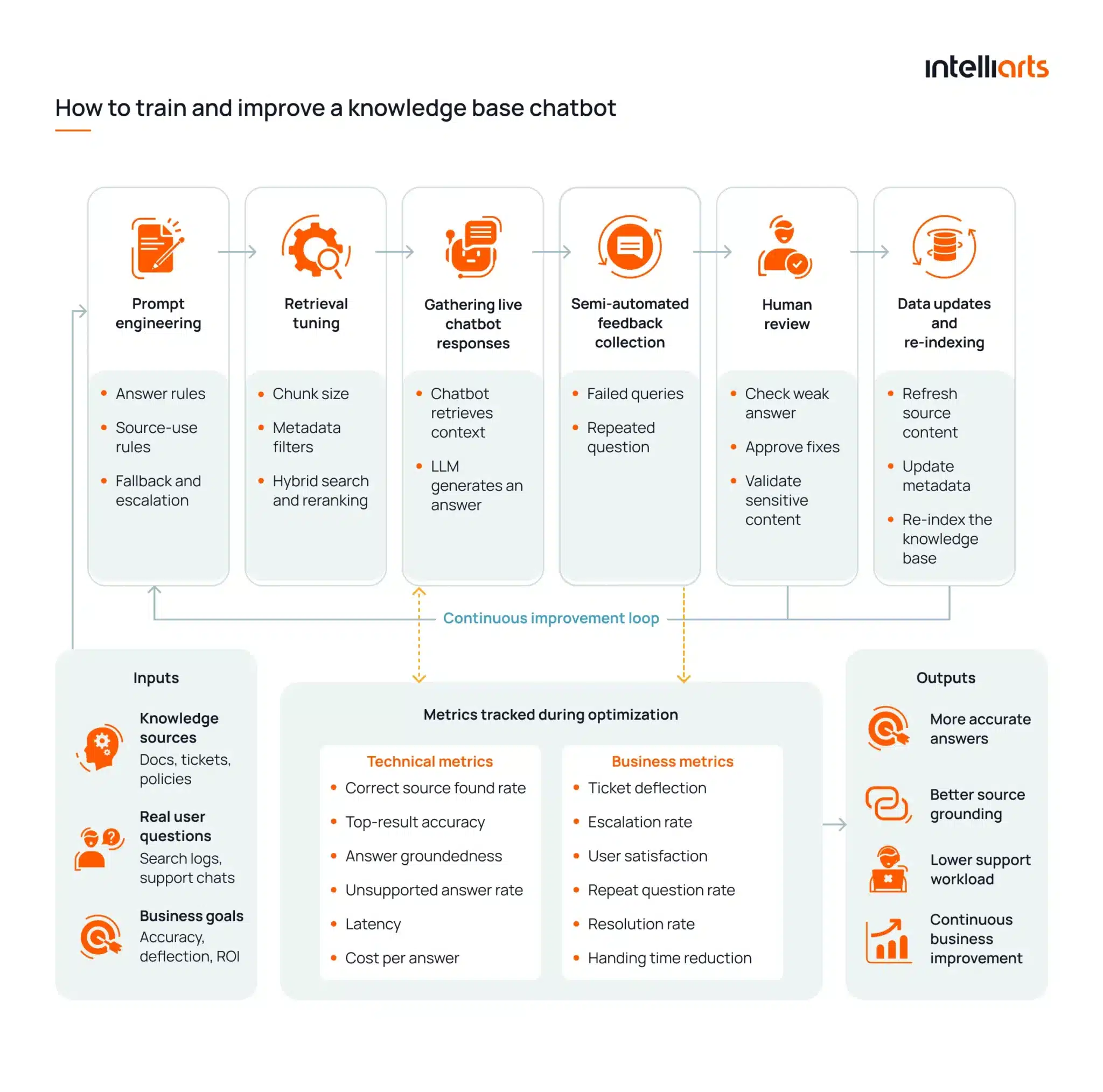
The biggest gains in accuracy, which is the biggest quality metric for an AI chatbot, usually come from stronger retrieval, better data sources, and regular review of user queries. By and large, development measures from the previous section, paired with subsequent training and improvement procedures, all work towards the same business goals.
What are the common challenges and how to solve them
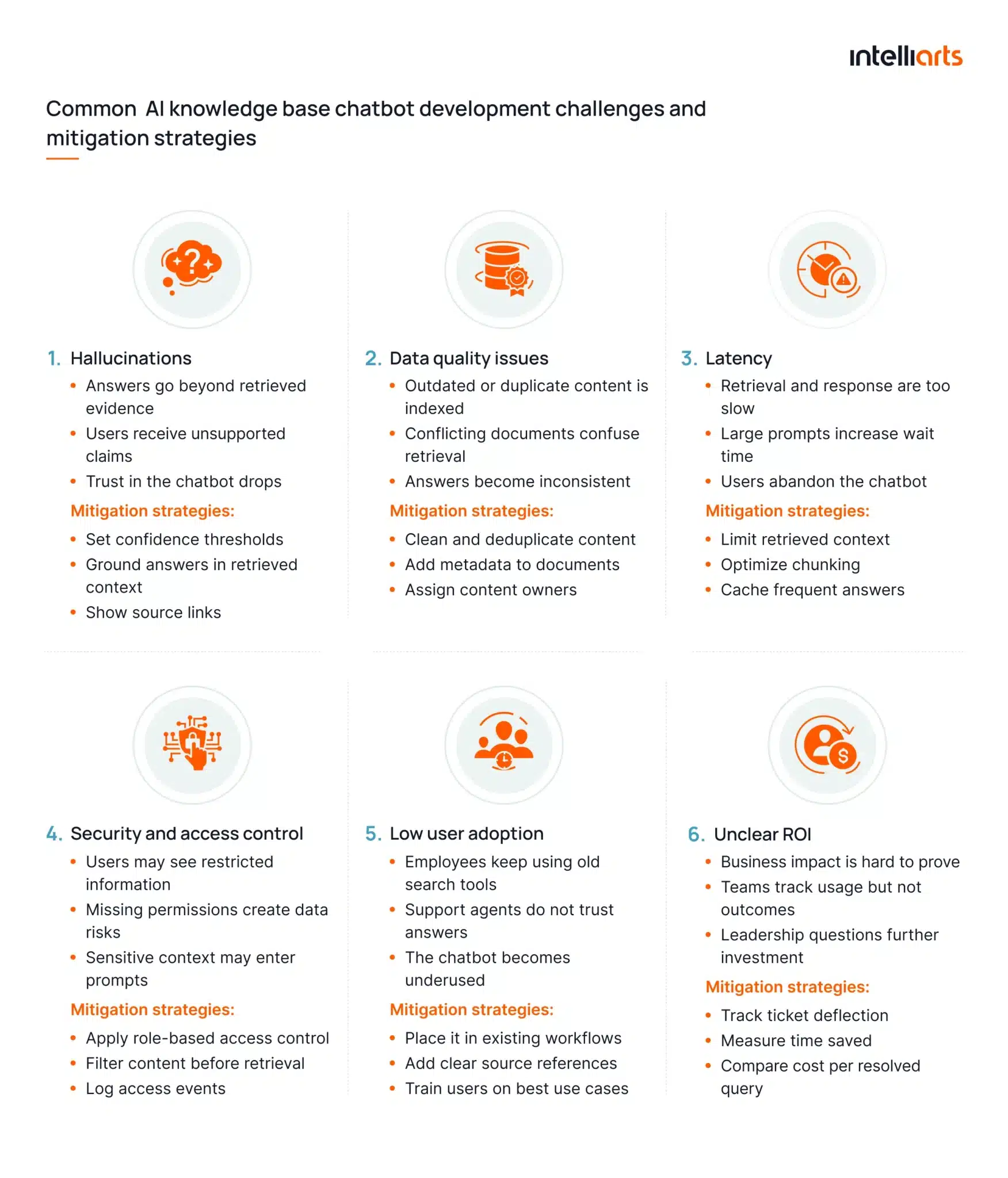
An AI knowledge base chatbot can fail in production when retrieval, data quality, latency, or access control are overlooked. See the common business and technical challenges as well as mitigation strategies in the image below:
Real-world use cases of AI knowledge base chatbots
An AI knowledge base chatbot can support different workflows depending on which sources it retrieves from, who uses it, and what output the business expects. The strongest use cases are usually tied to repeated questions, scattered documentation, or slow manual search.
1. Expert assessment and audit intelligence assistants
An expert assessment assistant helps consulting, audit, and advisory teams turn raw expert feedback into structured business insights. Technically, it works by processing expert comments, scores, categories, and subcategories through LLM-based workflows.
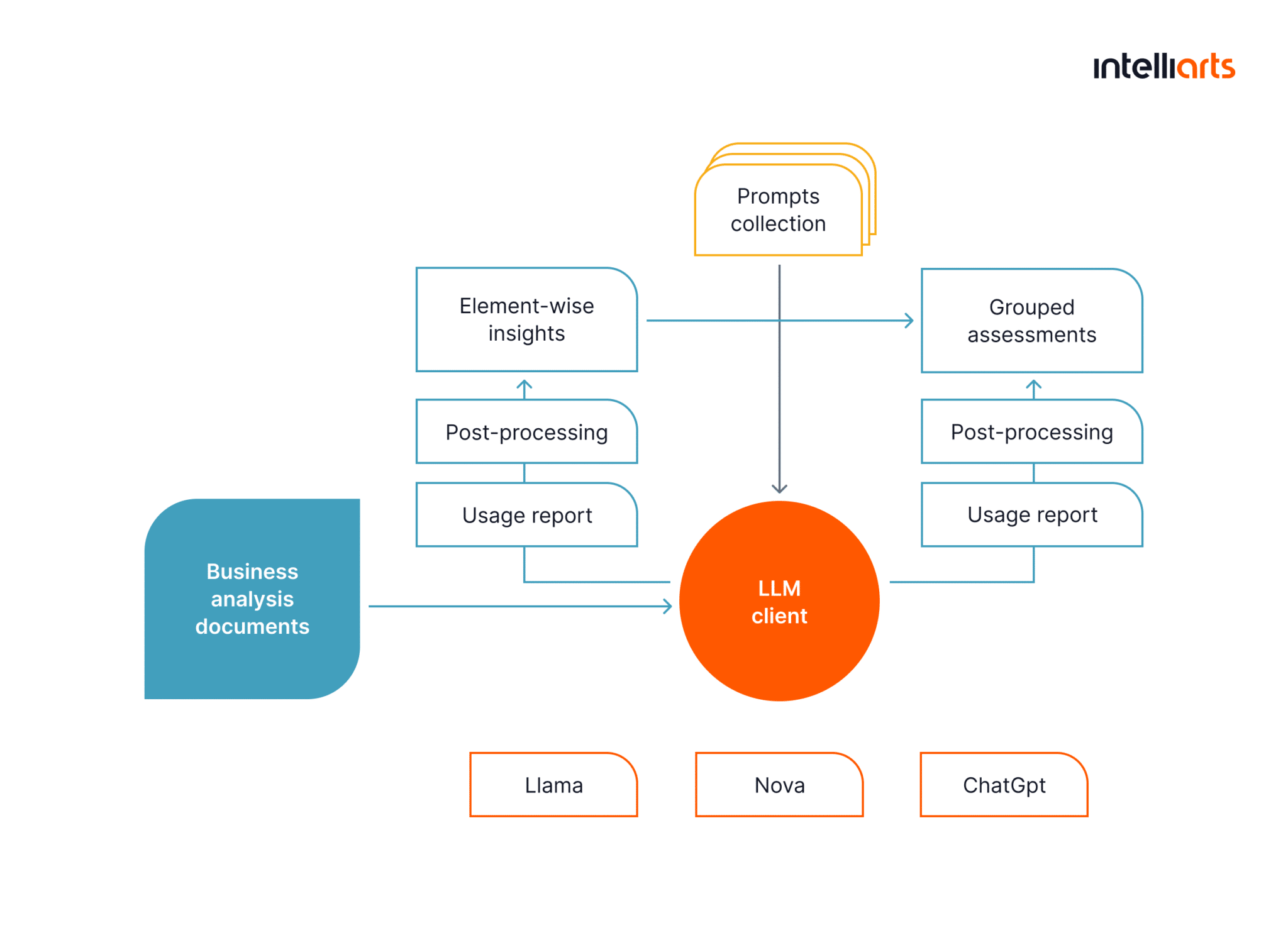
Output: Assessment summaries, scored category overviews, benchmark comparisons, management-ready insights, source-based references, and quality metadata.
Users: Consultants, auditors, project assurance teams, risk specialists, operations leaders, and company management.
Software example: Intelliarts built an AI-powered agent for Valency, a project assurance company in the construction industry.
The project also shows what this type of chatbot or AI agent needs in production. Intelliarts used structured prompts, iterative prompt optimization, SME review, quality checks with Pydantic and LangChain, and model evaluation across Claude, GPT, Llama, and AWS NOVA.
2. Customer support automation
A customer support chatbot retrieves answers from help center articles, FAQs, product documentation, and past tickets. Technically, it works as a RAG layer connected to support knowledge sources and escalation workflows.
Output: Direct answers, troubleshooting steps, source links, ticket summaries, and escalation suggestions.
Users: Customers, support agents, customer success teams.
Software examples: Intercom Fin is built for customer service and uses knowledge sources to power AI agents and self-serve support.
3. Internal knowledge assistants
An internal assistant retrieves information from company wikis, shared drives, policies, project docs, and collaboration tools. It helps employees ask questions in natural language instead of searching across multiple systems.
Output: Policy answers, project summaries, document references, internal process guidance.
Users: Employees, operations teams, managers, new hires.
Software examples: Glean connects to enterprise data and helps teams find answers, analyze data, and create content using company knowledge.
4. Developer documentation bots
A developer documentation bot retrieves from API docs, SDK guides, codebase context, issue trackers, and technical runbooks. It helps developers find implementation details without leaving their workflow.
Output: Code explanations, setup steps, API usage guidance, troubleshooting instructions.
Users: Software engineers, DevOps teams, solution architects, technical support.
Software examples: GitHub Copilot uses the editor and workspace context window to generate suggestions, while Copilot in GitHub Support provides configuration and troubleshooting steps based on official GitHub documentation.
5. HR assistants
An HR assistant retrieves from employee handbooks, benefits policies, payroll guidance, onboarding materials, and internal HR case data. Access control is critical because answers may depend on role, location, contract type, or department.
Output: HR policy answers, onboarding guidance, benefits explanations, case routing.
Users: Employees, HR teams, people operations, managers.
Software examples: Workday Help supports employee answers to HR questions, while Workday has described an AI-powered search that gives personalized HR and finance answers based on role, location, and needs.
“An interesting notion is that for enterprise teams, source grounding is perceived as a trust mechanism. Users need to understand where an answer comes from, and an AI knowledge base solution aids them vastly, cutting uncertainty and minimizing support tickets.” — Alexander Barinov, a Managing Partner at Intelliarts.
Why choose Intelliarts for AI chatbot development?

Here at Intelliarts, we approach AI development as an all-in-one product engineering task. We strive to make architecture, data quality, integrations, and other components of an AI knowledge base chatbot building process work together to deliver measurable, desirable business outcomes.
In our experience, a great product is not necessarily a technological wonder or an unnecessarily complicated piece of code. Bringing actual value to customers and their clients is what makes an AI solution worth the investment.
Our team can provide assistance to businesses looking for end-to-end development as well as companies with an in-house team across the full development path. From RAG architecture and LLM selection to building data pipelines, model training, and enterprise integration, we can cover it all and more.
Our ultimate goal is to contribute to your success through our RAG development, large language model development, and other services.
Intelliarts’ delivery approach is shaped by long-term engineering ownership:
- 15 years is our longest partnership with the same customer
- 4+ years is the average partnership duration on one project
- 90% of customers return to us with new projects
- 80+ successful large projects have been completed
Should you be interested in exploring the success stories of our customers, don’t hesitate to visit our portfolio page.
Final take
An AI knowledge base chatbot is useful when it connects real business questions with reliable company knowledge. RAG helps make this possible by retrieving relevant context before the LLM generates an answer. Still, the quality of the final system depends on data preparation, architecture choices, integrations, UI design, security, testing, and continuous improvement.
When these parts are handled properly, the chatbot can support customer service, internal operations, expert assessment, HR, and developer workflows with faster access to validated answers.
The Intelliarts team has been on the market for more than 26 years, providing software with AI agents, AI chatbots, and many more solutions for businesses from different domains. Our senior staff engineers are ready, willing, and able to consult you on your intended AI knowledge base chatbot. They will provide you with any assistance needed to roll out your best project successfully. Contact us.
FAQ
What is an AI knowledge base chatbot?
An AI knowledge base chatbot is a conversational system that answers user questions using company data, documents, FAQs, or databases. It helps teams retrieve accurate knowledge through natural language.
What is RAG in chatbots?
A RAG chatbot retrieves relevant information before generating an answer. This helps the system respond from approved knowledge sources instead of relying only on model memory.
Do I need fine-tuning to build a knowledge base chatbot?
Not always. Most enterprise chatbot implementation projects start with RAG because it is easier to update, control, and connect to internal knowledge sources.