

Enterprise adoption of large language models is accelerating rapidly. According to McKinsey’s 2025 State of AI report, 78% of organizations already use AI in at least one business function, while generative AI usage alone has reached 71% adoption across enterprises.
Despite this growth, many organizations still struggle to implement and, most importantly, scale AI effectively beyond general assistance with limited usage and an off-the-shelf database. This blog post will guide you through large language model development cost factors and drivers, as well as indicate key development stages. It will also show three approaches to LLM projects, which are to buy from a third party, fine-tune, and custom-build.
What is custom large language model development and why does cost vary?
A custom Large Language Model (LLM) is an AI system adapted to a specific business use case, where outputs, data access, and behavior align with defined tasks and workflows.
Examples of such LLMs include:
- Morgan Stanley GPT, built with OpenAI
- Khanmigo by Khan Academy
- GitHub Copilot by GitHub and Microsoft
- Duolingo Max by Duolingo
In practice, custom large language model development covers the creation of a full business solution, not a single AI model. After all, having an external or even your own AI model, like OpenAI or an Anthropic model, is basically having a backend engine rather than a ready-to-use product.
Custom LLM product development may include the following layers:
- Business use case definition and expected outputs
- Domain data selection, access rules, and structuring
- Model approach selection, like API-based, RAG, or fine-tuning
- Retrieval logic and response generation flow
- Integration with systems like CRMs, internal tools, or databases
- Output evaluation, validation rules, and guardrails
- Deployment setup across cloud or internal infrastructure
- Post-launch updates, monitoring, and iteration
The scope depends on how the system is used in operations. A narrow assistant that answers questions from a single dataset requires limited setup. A system that supports decision-making across multiple tools and data sources requires deeper integration, stricter validation, and ongoing tuning.
Now, let’s move on to discussing the cost of creating such a solution. The image below indicates all the factors that influence language model development cost:
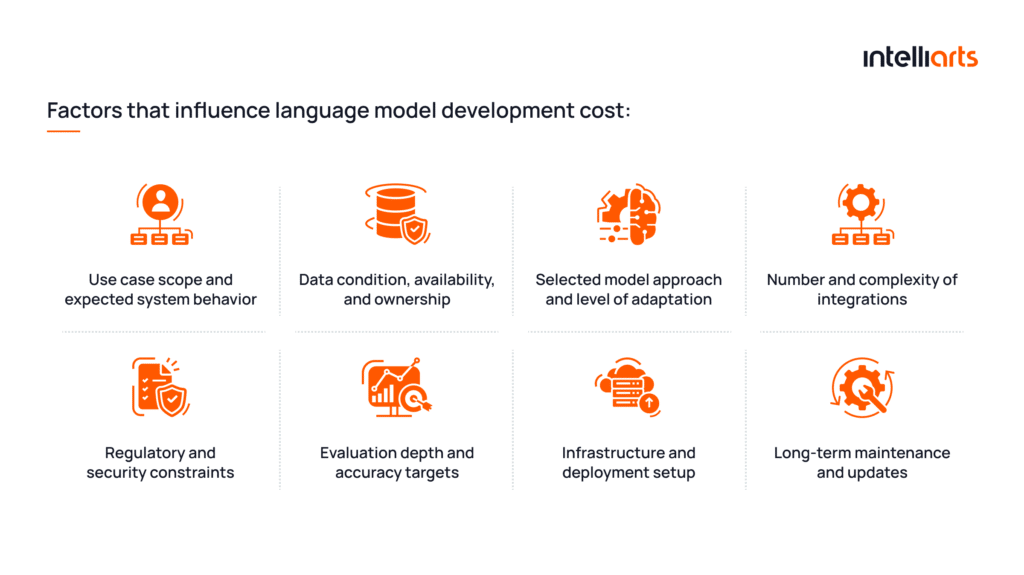
In this context, LLM development cost reflects the amount of engineering and product work needed to deliver a system that performs reliably within real business workflows.
Important note: The image shows what exactly affects the development price. It doesn’t take into consideration any possible measures to cut costs, as well as any unpredictable or unnecessary expenses that may arise. This cost factor overview will be complemented by a cost breakdown in the following sections.
Some teams underestimate how much of LLM development is not about the model. The value, cost, and actual effort lie in making outputs usable inside actual business workflows. — Alexander Barinov, a managing partner at Intelliarts.
What drives large language model development costs in 2026 additionally?
Now that you know the factors that comprise the budget for enterprise AI implementation, let’s find out more about possible project complications leading to extra expenses.
#1. Unusable data that required additional preparation
Acquired data for training and internal data for operation often cannot be used directly. Teams face:
- Fragmented sources like tickets, documents, and chats
- Inconsistent formats across systems
- Missing context required for correct outputs
This shifts effort toward building data pipelines and retrieval structures, which can take more time than model setup.
Learn extra details on data preparation in ML for a full insight into the LLM development challenge.
#2. Unmanaged accuracy expectations
From Intelliarts experience, it may be tricky to confirm the desired AI model accuracy. While an MVP of an enterprise LLM may seem to provide a suitable accuracy, actual usage often reveals the need for higher accuracy. This is exactly what may lead to extra rework during Large Language Model development.
Higher accuracy requirements change how the system is built. A basic setup may work for internal exploration, while business-critical use cases require controlled outputs, repeatability, and validation. This introduces additional layers such as structured retrieval, response formatting, and evaluation datasets tied to real scenarios.
#3. Integrations introduce hidden system complexity
LLM systems derive value from interaction with existing tools. For example, working with a CRM like Salesforce requires structured inputs, permission handling, and alignment with business rules. Integration logic becomes part of the core system, not a separate layer.
#4. Expanding scope during stakeholder feedback cycles
Once stakeholders see early versions, they are eager to add new requirements. These often include additional data sources, edge cases, or stricter accuracy expectations. Without strict scope control, teams continuously expand the system, which increases development cost beyond initial estimates.
#5. Selecting a model approach before defining output requirements
It happens fairly often that teams choose between API-based models, fine-tuning, or custom setups too early, based on assumptions or budget constraints rather than real output requirements. Once tested in real workflows, gaps appear. For example, API setups may struggle with structured outputs, while fine-tuned models may not handle dynamic data well. This leads to rework in retrieval design or even full architecture changes.
You may be additionally interested in exploring the full list of Large Language Models from another blog post by Intelliarts.
How does a custom LLM development workflow typically look?
When getting started with an LLM development project, you typically have a planned workflow. While the exact sequence of some steps and their scope may differ, let’s review a general flow as an example. The following workflow aligns with Gen AI lifecycle guides by Google, Azure architecture center documentations, and other industry practices, while also incorporating Intelliarts’ expertise.
Step 1. Discovery and use case definition
Input: Business goal, target users, initial idea
Teams convert a high-level request into a bounded interaction model. The focus is on defining how the system behaves under real conditions and how outputs are consumed downstream. This is also where testing requirements are defined early.
What must be fixed at this stage:
- Input structure, like user query, document, or system-triggered request
- Output contract, like free text, JSON schema, or action payload
- Acceptance criteria, including required fields and failure conditions
Deliverables: Use case specification document, input/output schema document, acceptance criteria and test requirements document
Step 2. Data assessment and preparation
Input: Internal data sources, documents, system access
Teams validate whether real queries can be answered with available data. The work focuses on making data usable for retrieval.
Core data work includes:
- Aligning data structure with how queries are asked
- Defining chunking based on information boundaries
- Adding metadata for filtering, ranking, and access control
This step often determines system quality more than model choice.
Deliverables: Data inventory and source mapping document, retrieval and indexing specification, metadata schema and access control definition
Step 3. Model strategy selection and validation
Input: Output requirements, data characteristics, constraints
Teams test different approaches using real queries and evaluate how outputs behave under constraints. The goal is to understand failure patterns before committing.
Validation focuses on:
- Ability to follow required output structure
- Stability across similar inputs
- Sensitivity to prompt or retrieval changes
This avoids committing to an approach that later requires system redesign.
Deliverables: Model evaluation report, comparison matrix of tested approaches, selected model strategy document
Step 4. System development and pipeline implementation
Input: Selected model approach, data design, architecture decisions
This is the core development step where the system is actually built. Teams implement how requests are processed end to end, including retrieval, model interaction, and response handling.
Development work includes:
- Building retrieval pipelines and context assembly logic
- Implementing prompt templates and the model interaction layer
- Developing orchestration logic for multi-step flows
- Creating APIs or services that expose the system
This step turns design decisions into working components.
Deliverables: Backend services and APIs, retrieval pipeline implementation, prompt and orchestration logic, integration-ready endpoints
Step 5. Solution architecture and integration planning
Input: Use case definition, data design, model behavior
Teams define how requests move through the system and where control is applied. This includes context construction, model invocation, and output handling.
Critical design points:
- Where retrieval is triggered and how context is assembled
- Where outputs are validated before use
- How errors are handled across system boundaries
Integration requires contract-level alignment. For example, working with a CRM like Salesforce requires strict schema compliance and permission-aware execution.
Deliverables: System architecture diagram, integration specification document, orchestration, and data flow design
Step 6. Evaluation setup, testing, and guardrails
Input: Real or simulated queries, expected outputs, and defined acceptance criteria
Teams build an evaluation layer that reflects real usage and defines measurable quality.
Key elements include:
- Test datasets based on real query patterns
- Defined failure categories tied to business impact
- Metrics for accuracy, completeness, and format compliance
Guardrails enforce constraints at runtime, ensuring outputs meet system requirements.
Deliverables: Evaluation dataset and test suite, quality metrics definition document, guardrails and validation rules specification
Step 7. Deployment, monitoring, and iteration
Input: Production usage, real queries, system logs
Teams analyze real behavior and adjust the system based on observed failures. The focus is on improving reliability under actual usage conditions.
Iteration targets:
- Retrieval failures and missing context
- Output inconsistencies or format violations
- Usage patterns that increase latency or cost
Deliverables: Monitoring and logging setup, performance and usage reports, iteration backlog, and improvement roadmap
Important note: Despite the presented workflow being a step-based one, in practice, these phases often run in parallel. Teams iterate across discovery, data, and evaluation while refining the system in short cycles. Agile delivery overlaps these stages to reduce rework and validate decisions early.
The following diagram shows a simplified LLM workflow spanning across key stages that influence the development cost:

Build vs buy vs fine-tune: Which option is most cost-efficient?
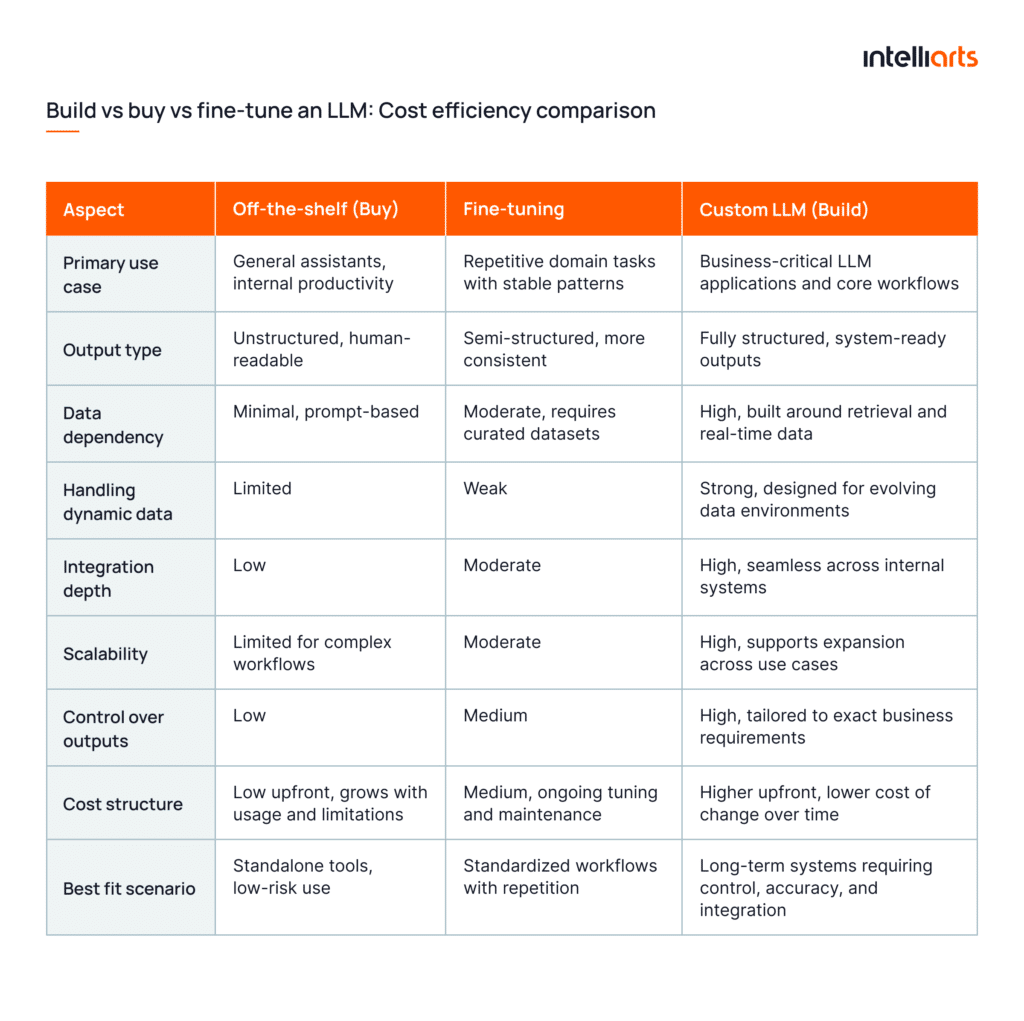
Cost efficiency in LLM development depends on how well the approach matches output constraints, data behavior, and system integration requirements. The wrong choice usually does not fail immediately. It rather creates hidden costs later through rework in retrieval, orchestration, and integration layers. Here are three main options and how they are justified:
When off-the-shelf tools are enough
Off-the-shelf solutions are cost-efficient when the desired solution is a standalone assistant for general working purposes.
They are suitable when:
- Outputs are for human usage, not other software systems
- No strict schema or deterministic behavior is required
- Data is either static or passed directly in prompts
- The system does not trigger actions or workflows
In these conditions, the system remains shallow. There is no need for retrieval pipelines, validation layers, or integration logic. Cost stays low because complexity is limited to prompt design and basic application logic.
Where teams lose cost efficiency is when they try to extend these tools into operational workflows.
When fine-tuning is justified
Fine-tuning becomes cost-efficient when limitations of off-the-shelf solutions become blockers, and extensive customization and RAG as an add-on is needed.
Typically, fine-tuning is used when the model must produce stable outputs across similar inputs without relying heavily on external retrieval. Building on top is justified when:
- Output format must be consistent across repeated tasks
- Domain-specific language or structure is not handled well by base models
- The same patterns appear across large volumes of similar queries
In such cases, it’s possible to develop a validation layer, a dataset, fine-tune features, add integrations, or make other adjustments on top of the existing solution.
It’s safe to claim that fine-tuning of the existing LLM for specific business needs is a balanced approach that offers both exceptional results and cost-efficiency, if approached in a proper manner.
However, it introduces a different cost structure. Teams must:
- Curate and maintain training datasets
- Validate outputs across edge cases
- Retrain as requirements evolve
It also does not solve dynamic data problems. Overall, fine-tuning is a way to solve some niche problems related to workflows, address off-the-shelf LLM-related challenges, or provide some additional usages without resorting to custom development.
Fine-tuning solves consistency issues, but it doesn’t remove the need for proper data access and retrieval when the use case depends on live information. — Andrii Shutka, DS Engineer and MLOps at Intelliarts.
When a custom LLM route makes business sense
A custom LLM approach becomes cost-efficient for enterprises with high budgets that intend to have a unique product as a part of the core business infrastructure.
Custom development is justified when:
- Sensitive outputs must follow strict schemas and be consumed by other systems
- The system interacts with multiple internal tools and data sources
- Decisions depend on real-life data
- The scale of potential LLM utilization is huge
In this setup, teams build a full system around the model:
- Retrieval pipelines aligned with query patterns
- Orchestration logic for multi-step flows
- Validation layers to enforce output structure
- Integration contracts with internal systems
Upfront cost is higher because the system is engineered for stability and control. Over time, this reduces the cost of change.
Unlike off-the-shelf and fine-tuning solutions, custom LLM development is fully suitable for further scaling and can comply with any security requirements. From the experience of Intelliarts engineers, scaling and data handling are the core issues that medium and enterprise businesses face. That’s why, for such businesses, custom is typically preferred.
Read about support automation with LLM for customer service in another blog post for additional insights on custom LLM applications.
What actually drives cost efficiency across all three, based on where technical complexity sits:
- Off-the-shelf → complexity stays outside the system
- Fine-tuning → complexity moves into model behavior
- Custom LLM → complexity is handled at the system level
Cost efficiency in LLM development comes from placing complexity in the layer that is easiest to control and maintain for a given business scenario while offering desirable results.
See the simple build vs buy LLM comparison table in the image below:
Intelliarts success story: Enhancing expert assessment with a custom AI agent

As an example of how custom LLMs solve business problems, in one of the case studies from our portfolio, the Intelliarts team built an AI-powered agent for Valency, a global leader in project assurance. The agent processes expert feedback and converts it into structured, consistent assessments. The solution applies prompt engineering, model evaluation, and validation layers.
As a result, assessment quality became more consistent, and decision-makers received clear, actionable insights. It also reduced processing time from 5 minutes per query to a few seconds. Built as a microservice, the solution is ready for integration into Valency’s cloud environment.
Explore the AI agent for smarter expert assessments success story.
Which cost components should buyers include in a realistic budget?
A realistic LLM development cost is distributed across several system-level components. The model itself is only one part of the total investment.
#1 Discovery and requirements
This stage defines what the system must produce in a form that engineering can implement. Cost comes from aligning stakeholders on exact outputs, edge cases, and failure handling before build starts. If skipped, teams later rewrite prompts, retrieval, and integrations after seeing real queries.
Typical share of total cost: 5–10%
#2 Data engineering and preparation
This is where most of the time goes. Cleansing data pursues the goal of making it retrievable and valuable for learning. Custom LLM development cost here comes from building pipelines, defining chunking that matches query behavior, and adding metadata for filtering and ranking. Without this, retrieval returns the wrong context and breaks output quality as the garbage-in-garbage-out (GIGO) rule.
Typical share of total cost: 25–40%
#3 Model development or adaptation
This is not about picking a model. It is about making outputs usable. Cost comes from enforcing structure, reducing variability, and handling edge cases where the model breaks format or logic. Fine-tuning adds dataset creation and repeated validation cycles.
Typical share of total cost: 10–20%
#4 Infrastructure and MLOps
Cost comes from making the system stable under real usage. Teams implement request routing, manage concurrency, and control token usage. Logging and tracing are required to debug failures that cannot be reproduced easily. These are not optional once the system handles production traffic.
Typical share of total cost: 10–20%
#5 Security, compliance, and governance
Cost appears when outputs must be controlled and auditable. Teams implement access rules at the query level, ensure data is filtered correctly, and track how outputs were generated. In regulated environments, this requires additional validation and logging layers that affect system design.
Typical share of total cost: 5–15%
#6 QA, evaluation, and post-launch support
Cost comes from building a system that can be tested repeatedly. Teams create datasets based on real queries, define failure categories, and track output quality over time. Without this, every issue requires manual investigation, which slows development and increases long-term cost.
Typical share of total cost: 10–20%
Important note: The specified cost shares are the insight of Intelliarts’ experts. For every business, cost distribution will vary because of the varying priorities and needs, especially in terms of infrastructure and AI model development.
Looking for specialized development assistance? Don’t hesitate to explore our AI development services.
What business factors increase or reduce total cost?
Now let’s find out what factors most influence custom LLM implementation cost in 2026, with both external and internal ones specified:
Internal cost factors
- Use cases and LLM applications. Cost depends on how outputs are used. Simple text generation is low effort, while structured outputs, actions, and multi-step workflows require orchestration, validation, and deeper testing.
- Data availability and structure. Fragmented or unstructured data increases cost because teams must build retrieval pipelines and align data with real query patterns before the system works reliably.
- Required integrations. Each integration adds constraints on data flow, permissions, and output format. Complexity grows with the number of connected systems and their dependencies.
- Internal team maturity. Experienced teams reduce cost through better early decisions. Less experienced teams often revisit architecture, which leads to expensive rework.
- Time-to-market expectations. Short timelines increase cost due to parallel development and later fixes. Longer timelines allow validation and reduce post-launch corrections.
External cost factors
- Geographic and regulatory scope. Compliance requirements affect how data is stored, accessed, and processed. This adds constraints that increase development effort.
- Model and vendor dependency. Choice of providers affects cost through pricing, limitations, and flexibility. Changing vendors later can require system adjustments.
- Market and competitive pressure. Pressure to launch quickly leads to reduced validation and optimization, which increases long-term cost.
- Infrastructure and cloud environment. Cloud pricing, scaling needs, and regional availability influence both development and operational costs, especially for high-load systems.
In practice, these factors rarely act in isolation. Constraints overlap, such as complex LLM applications combined with fragmented data, multiple integrations, and strict regulatory requirements. On the other hand, cost remains more predictable when the use case is clearly scoped, data is accessible, and the system operates with limited dependencies.
How to estimate ROI from custom LLM development
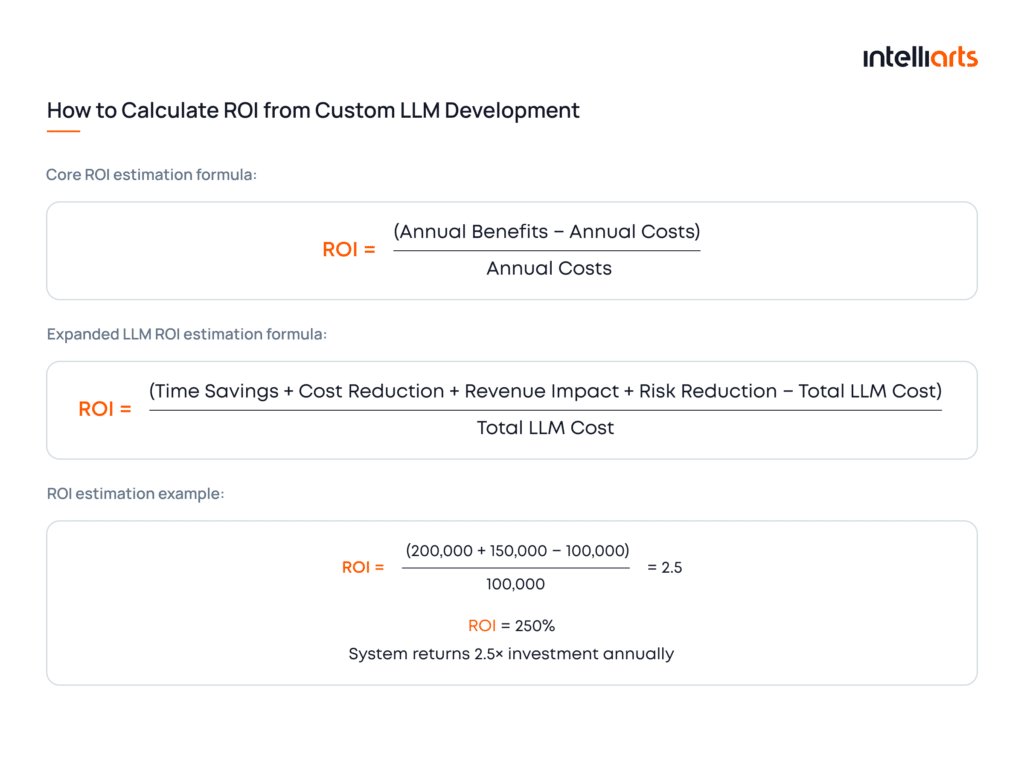
ROI from custom LLM development equals the total measurable business value generated by the system compared to its full cost.
In practice, it reflects the impact of four things combined, relative to the amount of investment:
- Efficiency gains → time saved per task × volume × cost per hour
- Workflow automation → number of tasks replaced × cost per task
- Quality improvements → reduction in errors × cost of fixing them
- Strategic impact → faster decisions and better use of internal data
In other words, ROI captures how much value the system produces across these four core operations.
A higher ROI indicates that the development resulted in additional value from accelerated processes or better LLM outputs. And this value is big enough to justify the investment made.
See the core and LLM development-specific calculations, as well as the example of ROI estimation in the infographics below:
Final take
Custom large language model development cost depends mainly on system architecture and process design. Data quality, integrations, and output requirements are only a few of the suite of factors that impact both effort needed and ROI. Off-the-shelf and fine-tuned solutions serve limited cases, while custom LLMs support scalable, integrated workflows. Cost efficiency comes from aligning architecture with real business needs.
Intelliarts has been on the market for more than 26 years, delivering top-notch ML, LLM, and other AI solutions for businesses. With over 90% customer return rate, and 92% of senior staff engineers in-house, we can contribute to your custom LLM project regardless of its complexity. Don’t hesitate to reach out for consultation, advice, or a quote.
FAQ
How much does custom large language model development cost?
Custom large language model development cost varies by approach. A $30,000–$80,000 budget typically covers a RAG-based assistant using external APIs (e.g., OpenAI or Anthropic models). $80,000–$250,000 supports fine-tuned domain models. $300,000–$1M+ applies to fully custom LLM systems with proprietary data pipelines, MLOps, and enterprise integrations.
What affects LLM development cost the most?
The biggest cost drivers are data readiness, model approach, integration depth, and compliance requirements. For example, a simple chatbot using existing APIs costs far less than a system that must connect to internal tools, handle sensitive data, support evaluations, and meet enterprise governance standards.
Is fine-tuning cheaper than building a custom solution?
Usually, yes. Fine-tuning is often cheaper because it adapts an existing foundation model instead of requiring a more extensive custom architecture. For example, a fine-tuned internal assistant may fit an $80,000–$250,000 range, while a more custom enterprise AI system can start around $300,000+.





![Top MLOps Tools in 2026 and Their ROI [Based on Real Projects]](https://intelliarts.com/wp-content/uploads/2026/08/ChatGPT-Image-23-июн.-2026-г.-11_16_54-1.webp)