




Over the past few years, businesses have been rapidly adopting AI to automate and improve their processes. About 64% of businesses expect AI to increase productivity, so the hopes put into AI are huge. Claude AI vs ChatGPT are some of the most commonly utilized options on the market for such purposes. But which one should you use for your particular business objectives?
In this post, you’ll discover key differences between Claude and ChatGPT, explore their use cases, and find out in what scenarios the Intelliarts team, as software dev experts, would use one or another model.
Overview of Claude and ChatGPT
Claude AI, developed by Anthropic, is an advanced large language model designed for natural language understanding and interaction.
Claude AI is named after Claude Shannon, a pioneering figure in information theory. The platform is tailored for business use, particularly in customer service automation, data analysis, and content generation, providing real-time responses. It uses reinforcement learning from human feedback (RLHF) to improve over time, making it a flexible and adaptable tool for a wide range of industries.
At the same time:
ChatGPT, developed by OpenAI, is a large language model designed for natural language processing and understanding.
ChatGPT is based on the GPT (Generative Pre-trained Transformer) architecture and is capable of generating human-like text based on input prompts. ChatGPT can engage in conversations, provide detailed explanations, assist with content creation, and automate tasks like customer support and data analysis. It continuously improves through reinforcement learning and feedback.
Claude vs ChatGPT: Key differences & similarities
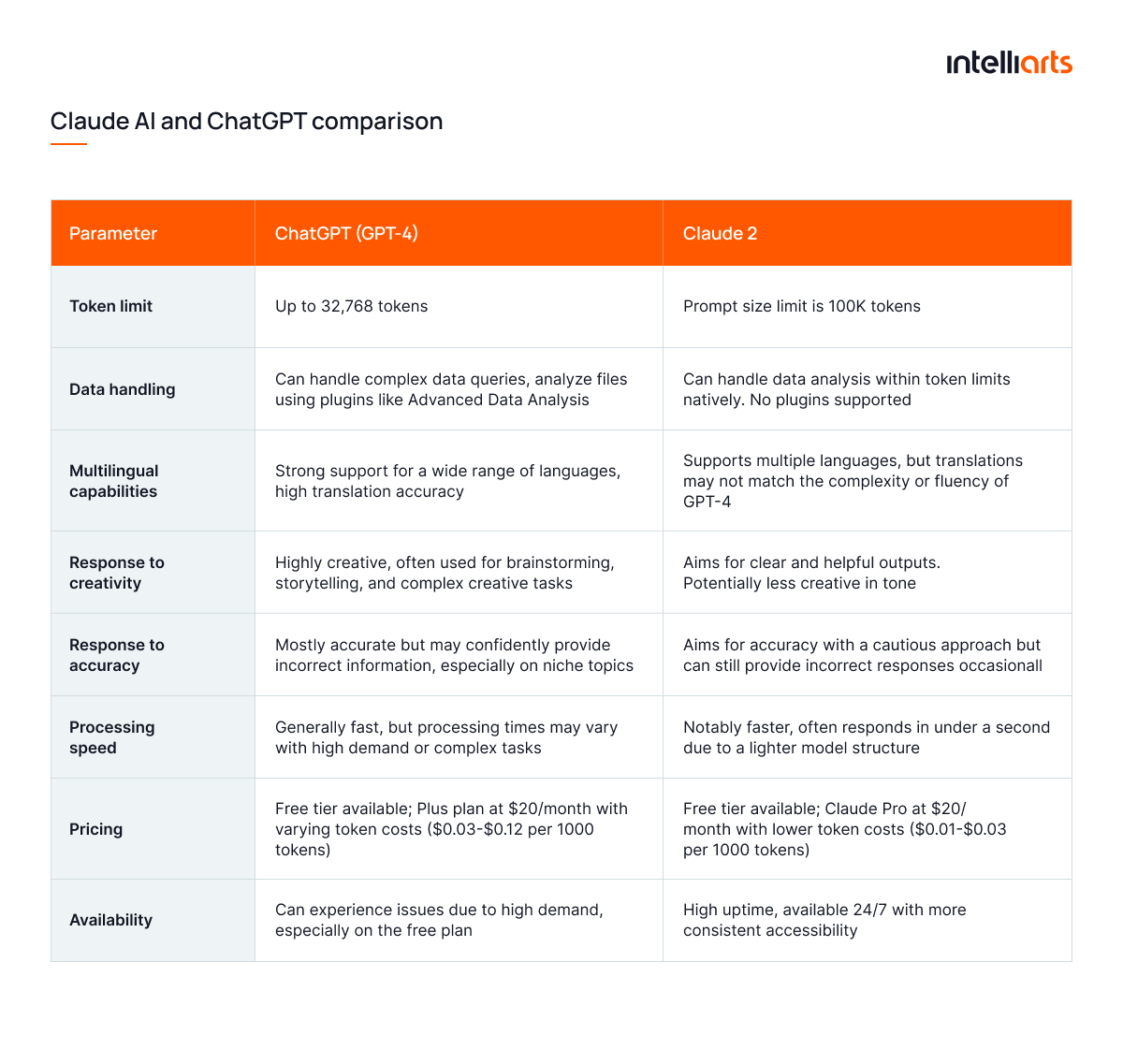
Let’s proceed with Claude vs ChatGPT comparison across eight factors below:
So what’s different?
While both Anthropic’s Claude vs OpenAI’s ChatGPT are powerful LLMs, they differ in many areas. Let’s discuss the top 5 differences between these most popular LLMs:
- Multimodality and ecosystem features: ChatGPT offers broader, “all-round” support for features like image generation, voice input/output, plugins, and browsing. For instance, a user can upload an image and generate a caption for it or modify the image using ChatGPT. Claude has a more limited functionality for now and fewer integrations. For example, you can upload an image there for analysis, but it still doesn’t have the full image generation.
- Long-form reasoning strength: Claude works with long-form prompts much better than ChatGPT. It’s often praised for handling deep, long-context inputs and producing focused outputs. ChatGPT will need more guidance in this case.
- Use cases: A specific AI agent can perform better depending on a use case. In brief, Claude is believed to be most useful in creative writing, coding, and logic-intensive tasks. ChatGPT is more generalized across different types of tasks, mostly because of its diverse integrations.
- Integrations: ChatGPT has more benefits in this case, with the ability to integrate with many third-party tools, such as Slack, CRMS, and Google apps. Claude is suitable for businesses with deeper contextual work and stricter data handling. Respectively, it has fewer integration options (though still more than enough!).
- Data privacy and enterprise control: Claude puts stronger emphasis on data privacy and safety, offering options that limit data retention and model training on user inputs. In contrast, ChatGPT, especially the free version, may use conversations for training unless users opt out or use enterprise plans.
What’s similar?
We’ve talked about the core differences between Chat GPT vs Claude. Now let’s move to top 5 similarities:
- Both are advanced LLMs: Both are AI agents built on powerful LLM architectures that can handle tasks like summarisation, translation, information retrieval, etc.
- Text generation and conversations: ChatGPT and Claude are designed to generate natural-language responses in the most efficient way, including engaging in dialogues, answering questions, brainstorming content, etc.
- Technical tasks: Both models perform well when it comes to supporting programming- and logic-oriented tasks such as writing code, debugging, or generating tech documentation. They still might differ in strength and style.
- Multi-purpose: ChatGPT and Claude are general-purpose AI assistants rather than narrowly specialized tools, although they perform better in particular use cases.
- Need for human oversight: Both platforms work as assistants and cannot replace humans. This means that despite their potential, ChatGPT and Claude share limitations, such as AI hallucinations, factual errors, and context limits. Thus, users must verify their outputs.
You may be interested in exploring AI development solutions to automate processes.
Model lineup and access
Before diving into pricing and performance, it’s worth understanding what model families each platform offers.
Claude family (chat & API)
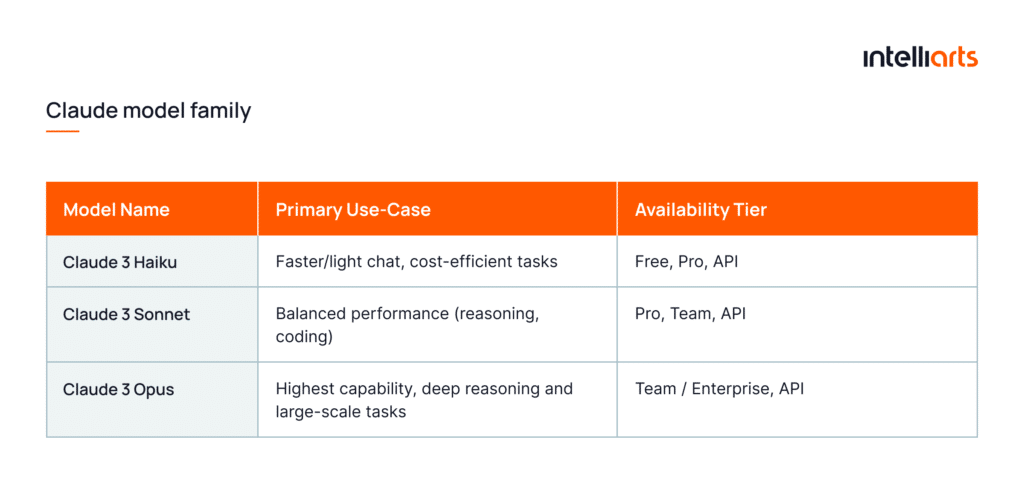
The Claude model family by Anthropic offers a tiered approach to capability, enabling users to choose models that suit their business workloads These could be as lightweight interactive chats as heavy agentic workflows via API. The current lineup includes models:
- Haiku — fastest and most cost-efficient
- Sonnet — balanced speed and capability
- Opus — highest capability
Developers can access these models through the Claude Developer Platform and via cloud partners, such as Amazon Bedrock or Google Vertex AI with supported regions outlined in Anthropic’s documentation.
ChatGPT family (chat & API)
The ChatGPT ecosystem now features the GPT-5 family of models, offering different performance levels and pricing for both chat and API users. Through the ChatGPT interface and API, users can access models optimized for diverse workloads, from enterprise-grade reasoning and coding to lightweight automation and summarization. Each model tier differs based on cost, speed, and context-size requirements.
OpenAI’s dev documentation and model-selection guide help choose the appropriate model for their workload, whether it’s research, coding, or interactive chat.
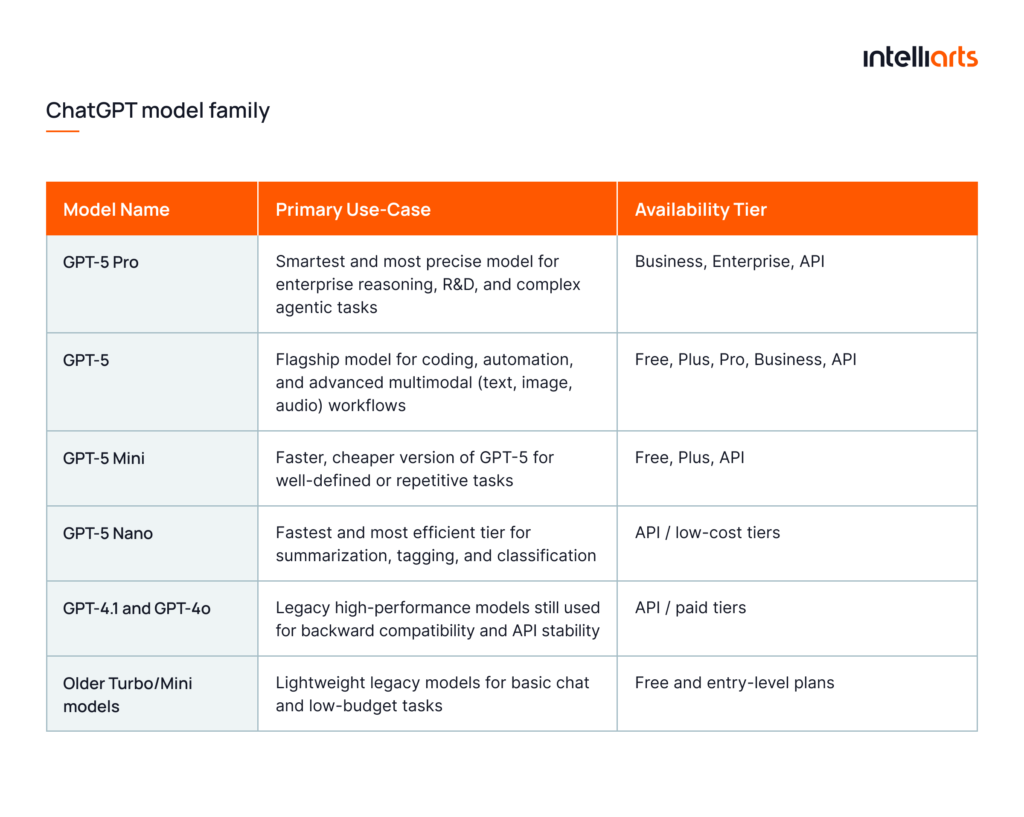
Availability by region, free vs paid tiers
Note that access to both Claude AI vs ChatGPT varies by region and tier. For example, ChatGPT’s Free tier still offers strong features, for example, in terms of model access or image uploads, but with stricter usage limits.
ChatGPT has also introduced region-specific plans, such as “ChatGPT Go” in India. These offer expanded access at lower cost but are geographically restricted.
On the Claude side, model availability via cloud partners shows regional coverage across multiple AWS/Google regions for models like Claude 3 Opus, Claude 3 Sonnet, etc. If a business operates in a regulated region like the EU, it’s better to check whether the model family supports the region.
Pricing and value
With both model families now outlined, the next logical step is to look at what it actually costs to use them. Below is an overview of how Claude and ChatGPT are priced in 2025, from monthly chat plans to API token rates and enterprise-grade total cost of ownership (TCO).
Chat tiers: Monthly plans and limits
Both AI agents offer subscription-based chat access tiers that scale from free usage to enterprise-level plans.
For ChatGPT:
- The Free tier ($0/month) gives access to GPT-5 for everyday tasks, with limited messages, uploads, image generation, and context size
- The Plus plan ($20/month) offers faster responses, higher usage limits, and expanded GPT-5 access, including agent mode, deep research, and Codex. It also grants image and limited video generation through Sora 1
- The Pro plan ($200/month) provides unlimited GPT-5 access with the fastest response time and expanded reasoning. It also has full Sora 1 integration and priority access to new experimental features
- The Business and Enterprise plans ($25-30/user/month) offer secure collaborative workspace, larger context windows, and more advanced security features
For Claude users:
- The Free tier ($0/month) offers access to Claude 3 Haiku with standard response speed and limited daily usage
- The Pro plan ($20/month) unlocks more capable Claude 3 Sonnet, which grants faster performance, higher usage limits, and priority access during peak hours
- The Max plan ($100/month) expands on Pro with X5 or X20 more usage, higher output limits, memory across chats, and early access to new Claude features
- The Team and Enterprise ($25–$30 per user/month for standard seats and $150 for premium seats) provide access to the full Claude 3 family, including the high-end Opus model, along with increased rate limits, collaboration features, admin controls, and dedicated support
API pricing
Because of its impact on scalability and cost efficiency, API pricing is more relevant for developers and product teams that build custom integrations. Both Claude vs ChatGPT-4/GPT-5 use a token-based billing model, where input (prompt) and output (response) tokens are charged separately together with optional image or tool-use fees.
Review the chart to compare Claude vs Chat GPT pricing in more detail:

Total cost of ownership: Teams & enterprise
When evaluating enterprise-scale adoption of Anthropic Claude vs ChatGPT, it’s also important to look beyond per-seat subscriptions and token rates and focus on TCO:
- For ChatGPT, the Team plan starts at $30 per user/month (or $25 with annual billing) for small-to-mid sized teams. For enterprise businesses, it’s around $60 per user/month with a minimum of 150 seats.
- For Claude, the Team tier costs $30/user/month. Meanwhile, enterprise pricing is negotiated and not widely published.
For both platforms, TCO includes user seats, API consumption, premium models, larger context windows, integrations, governance and compliance features.
Performance by use case
Now, let’s review particular use cases of Claude AI vs GPT-4/GPT-5 in business:
Writing & editing
When to choose ChatGPT
ChatGPT is a go-to solution for businesses that need to generate creative ideas and content. Whether it’s coming up with marketing strategies, creating social media posts, or drafting compelling advertising copy, ChatGPT’s creativity and language capabilities make it a powerful tool for agencies and companies in marketing and advertising.
Example: BuzzFeed famously employs ChatGPT to produce quizzes, articles, and personalized content, streamlining content creation while maintaining engagement.
When to choose Claude
Claude is particularly effective for summarizing long texts, refining complex reports, or generating documentation. Its balanced tone and contextual understanding make it suitable for professional writing, such as legal summaries, technical reports, and compliance materials.
Coding & dev workflows
When to choose ChatGPT
If you need help with code generation or debugging, ChatGPT is well-suited for the tech industry. It can generate code snippets, explain programming concepts, and assist in debugging code, making it a valuable tool for developers looking to save time or work through complex coding problems. So, if you’re wondering what is best for coding, ChatGPT or Claude, ChatGPT is the preferred choice in this case.
In more advanced discussions, developers may also touch on topics like anti debugging techniques when analyzing how software behaves under different inspection or testing scenarios, which can deepen overall technical understanding.
Example: GitHub Copilot, powered by OpenAI’s models, assists developers by suggesting code and even debugging issues in real time.
When to choose Claude
Claude’s Sonnet and Opus models are designed for complex reasoning and multi-step logic. This could be helpful for backend development, automation scripts, and code review. Moreover, through Claude Code (available in Pro and Team plans), users can create, execute, and test scripts directly.
Research & synthesis
When to choose Claude
Claude truly excels in research-heavy contexts. Its large context window enables it to handle long, complex documents, and this is ideal for legal reviews, policy analysis, and academic or financial reports. It’s particularly effective in synthesizing multiple data sources and extracting insights from unstructured information.
So, here’s where Claude AI is the best at:
- Large-scale document processing: Handles long, complex documents efficiently with its high token limit, ideal for contracts or compliance reviews
- Summarization of extensive content: Provides concise summaries from large bodies of text
- Data-intensive research and analysis: It’s well-suited for synthesizing large, complex datasets or scientific reports
Example: JP Morgan’s COIN (Contract Intelligence) system uses AI to analyze thousands of legal contracts.
When to choose ChatGPT
While Claude specializes in document comprehension, ChatGPT works best for idea generation and exploratory research. Use it for brainstorming topics, generating structured outlines, or simplifying technical information for broader audiences.
Multimodal (images, audio, video)
When to choose ChatGPT
OpenAI’s GPT-5 and GPT-4o families include strong multimodal support, allowing users to upload and interpret images, generate visuals, and even create video. This makes ChatGPT a natural choice for marketing, design, and education industries that rely on visual or audio inputs.
When to choose Claude
Claude supports image and text analysis but does not yet offer full multimodal generation. It can interpret diagrams or visual data within documents, making it suitable for analytical rather than creative visual tasks.
Data analysis & agents
When to choose Claude
For sectors that rely on data-intensive research and analyze large datasets, such as financial services and banking, Claude AI shines. It can help with processing market reports, financial statements, and regulatory guidelines, making it easier for analysts and compliance teams to interpret vast datasets and gain actionable insights. This is particularly valuable for financial marketing agencies aiming to craft data-driven campaigns that align with market realities. So, if you’re asking, is Claude AI better than ChatGPT to analyze financials? The answer is likely yes.
Example: BlackRock uses AI tools, including Claude AI, to analyze financial data and optimize investment strategies.
When to choose ChatGPT
For businesses that handle large volumes of customer interactions, ChatGPT’s conversational capabilities are unmatched. It’s an excellent choice for developing chatbots or virtual assistants to automate customer support, answer inquiries, and provide personalized service in real time. E-commerce, in particular, benefits from this as it aims to improve customer experiences with scalable, efficient service.
Example: Instacart uses the ChatGPT plugin to power a personal grocery shopping assistant.
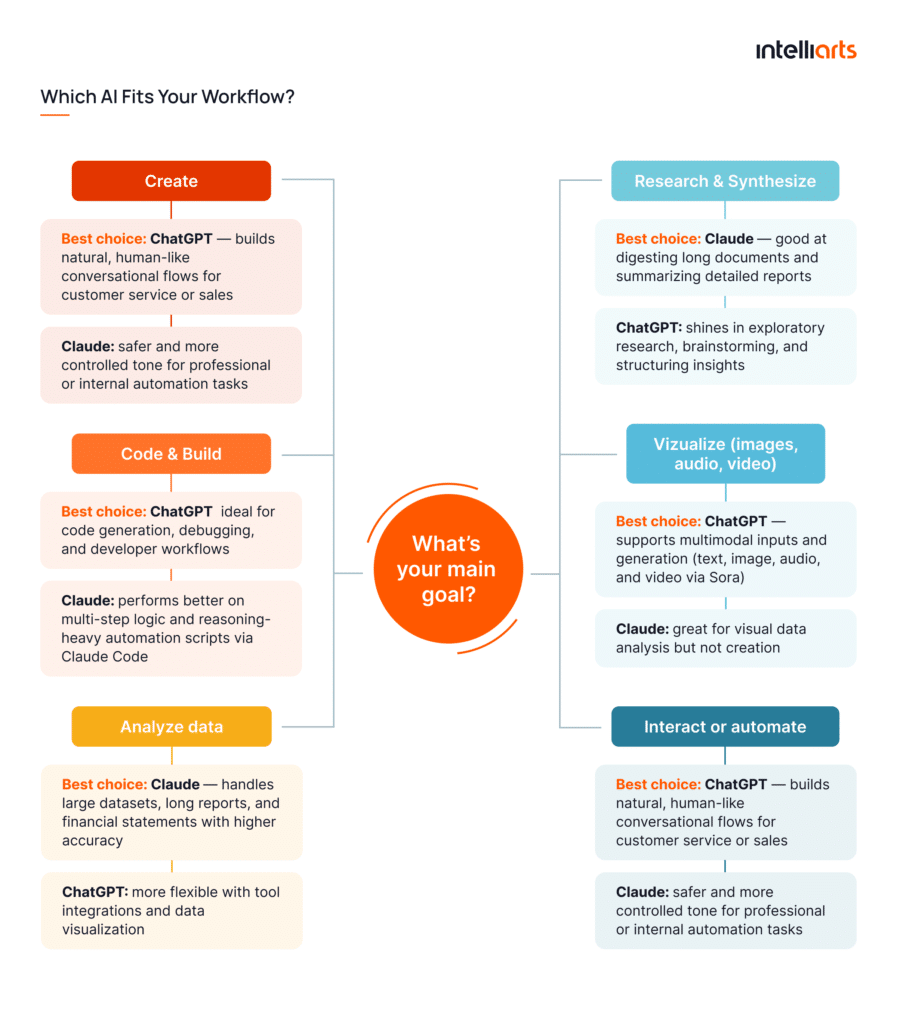
When it comes to the listed applications, Claude vs GPT has specific context when to be used. Here’s what our expert has to say about Claude AI vs ChatGPT comparison:
Both models are strongly capable, and it’s hard to tell for sure whether Claude AI or ChatGPT should be used for NLP, development, automation, or other tasks. I find it exciting to apply both models to discover which one is a better fit. — Andry Shutka, ML and big data expert at Intelliarts
Benchmarks & real-world tests
While user experience often defines which model “feels” better, quantitative benchmarks help reveal where Claude and ChatGPT prove best technically. Let’s review the results of each.
Reasoning and math
Claude 3 Opus 4.1 leads in structured reasoning and complex mathematical logic, especially when multiple intermediate steps or long-context calculations are needed.
GPT-5 still shows better results when it comes to symbolic reasoning and improved chain-of-thought planning. In enterprise settings, this means that GPT-5 provides more precise results for forecasting, optimization modeling, and financial simulation.
Coding benchmarks
When measured on programming datasets such as HumanEval+, MBPP, and LeetCode-Hard, GPT-5 remains the strongest coding model. Plus, it’s architecturally aligned with Codex and has integrations with developer tools like GitHub Copilot and VS Code, which makes it more practical for everyday coding tasks.
GPT-5 is the smartest coding model we’ve used. Our team has found GPT-5 to be remarkably intelligent, easy to steer, and even to have a personality we haven’t seen in any other model. — Michael Truell, Co-Founder & CEO at Cursor
Claude Sonnet 4.5, meanwhile, performs well on algorithmic reasoning and code explanation tasks, often producing cleaner and more readable code.
Long-context retrieval
Claude has a clear advantage here. Its architecture supports context windows up to 200K–500K tokens, enabling it to process hundreds of pages of material in a single pass. This makes it more reliable for enterprise document analysis, compliance auditing, and legal discovery.
GPT-5 narrows the gap with 256K tokens on Pro and Enterprise. However, for uninterrupted reasoning over large documents, Claude Opus remains the top performer.
Creative writing prompts
Both models produce high-quality creative text, but their tone differs. Go for ChatGPT when you need storytelling, marketing copy, and dialogue generation. The model leans toward expressive, story-driven outputs with natural voice and emotional range.
Claude Sonnet 4.5 tends to deliver structured and balanced creative outputs. It’s ideal for thoughtful essays, professional scripts, or long-form narratives. In blind user tests, Claude ranked top 1 for narrative consistency, while GPT-5 ranked top 1 for originality and humor.
Context window and memory
The ability to remember, reference, and reason over large amounts of text determines how effectively a model can perform long-running or multi-document tasks. This refers to memory and context capabilities of the two models.
Max context size and practical limits
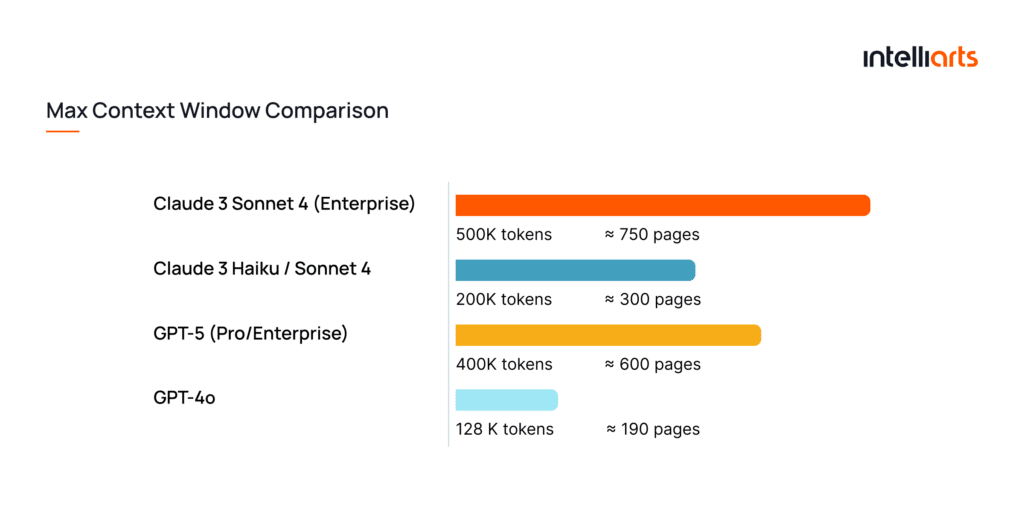
Claude’s context window remains one of the largest in the industry. This is 200K tokens across all models and paid plans, with Claude Sonnet 4 supporting up to 500K tokens for users on Enterprise plans. This allows users to process the equivalent of several hundred pages of content in a single query.
In contrast, OpenAI’s GPT-5 supports context windows of up to 256 k – 400K tokens, depending on the plan and interface. While its raw context limit is slightly smaller than Claude’s, GPT-5 introduces improved context management and retrieval efficiency. This allows the model to focus on the most relevant information within long inputs and makes it more practical for multi-document reasoning or exploring codebase.
Document-grounded chat workflows
Claude’s long-context strength translates directly into document-based workflows. Users can upload contracts, policies, research papers, or entire codebases and receive consistent, context-aware analysis.
In enterprise environments, Claude’s focus on grounding responses within uploaded materials helps reduce AI hallucinations and improve factual accuracy. Anthropic reports that introducing the “Citations” feature in Claude reduced source hallucinations and formatting issues from 10% to 0% and increased references per response by around 20%.
ChatGPT offers a different approach. It relies on retrieval-augmented memory, referencing documents stored within a workspace rather than keeping them all in active context. Its “projects” and “data analysis” tools make document-driven chats more modular. In other words, users can switch files, generate summaries, or visualize data interactively without re-uploading.
Session continuity and workspace memory
Session continuity refers to how long a model can “remember” within a single active chat. If to compare Claude vs GPT:
- For Claude, session continuity is handled entirely within the context window. The model retains all previous turns in a session (up to 200K–500K tokens). Once the chat is closed, memory resets unless you’re using Anthropic’s enterprise connectors.
- For ChatGPT, continuity was initially limited to a single browser session or chat thread. But when the “projects” and “memory” features were introduced, it’s now extended to several days or weeks. “Projects” can act as persistent workspaces where the model can “remember” documents, former outputs, and instructions.
In contrast, workspace memory extends beyond one session. In 2025, both ecosystems moved from static session memory toward persistent workspaces, but they differ philosophically:
- ChatGPT introduced Workspace Memory, where users can view, edit, or delete saved context. This gives users precise control over what the model remembers. This memory is opt-in by default and now powers “projects” and “tasks”, benefiting users with ongoing collaboration or multi-day workflows.
- Claude takes a different, privacy-first approach. It doesn’t store user data between chats unless integrated via enterprise APIs. Within a single session, its memory still remains highly consistent due to extended context.
Safety, controls, and governance
As AI systems become more deeply embedded in business workflows, their reliability and security measures matter as much as performance. Both platforms invest heavily in security and compliance, though their approaches differ again.
Guardrails, style guides, and red-teaming
Both Anthropic and OpenAI have established multi-layered safety pipelines to grant responsible model behavior. Anthropic employs a Constitutional AI framework, training Claude models to follow predefined ethical principles rather than relying solely on reinforcement learning. This approach improves transparency and reduces biased or unsafe responses. Recent reports show that Claude models reached AI Safety Level 3, reflecting Anthropic’s focus on measurable safety thresholds.
OpenAI maintains internal red-teaming networks to probe for bias, misuse, and emergent risks. This means that a group of experts deliberately stress-test models to uncover risks before each major release. Besides, the platform relies on Preparedness Framework, which defines risk tiers and capability thresholds for model deployment. It’s also considered one of the industry’s most formal safety governance systems.
Prompt injection and data-leak protections
GPT-5 introduces stricter sandboxing and Model Spec security layers to prevent prompt leaks through connectors, GPTs, or browser tools.
Similarly, Claude models are trained with an explicit “refusal criterion” that detects and resists indirect prompt injections. Enterprise users can apply additional moderation or AWS Bedrock Guardrails for policy enforcement.
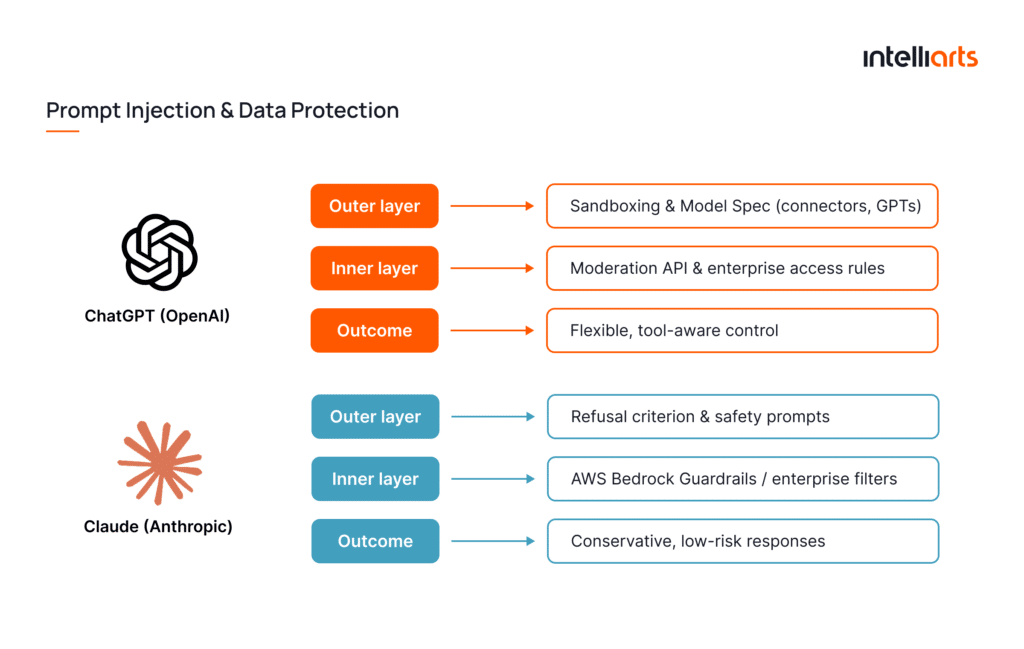
This way, Claude’s refusal training tends to make it more conservative in edge cases. Meanwhile, ChatGPT provides more granular control for business connectors and multi-tool use thanks to model-specs.
Content policy differences
The two companies diverge slightly in policy scope and data handling. OpenAI applies a broad content policy restricting adult, violent, or political content. It also automatically moderates outputs through the OpenAI API moderation endpoint.
To compare, Anthropic emphasizes privacy and autonomy. Claude’s API does not train on user prompts by default, and Anthropic guarantees no use of business data for future model training. That’s why enterprises with strict security policies often prefer Claude’s approach.
Integrations & ecosystems
Both AI agents become more powerful when they act inside your systems, automating repetitive tasks and serving as a layer between human and data. That’s why integrations matter.
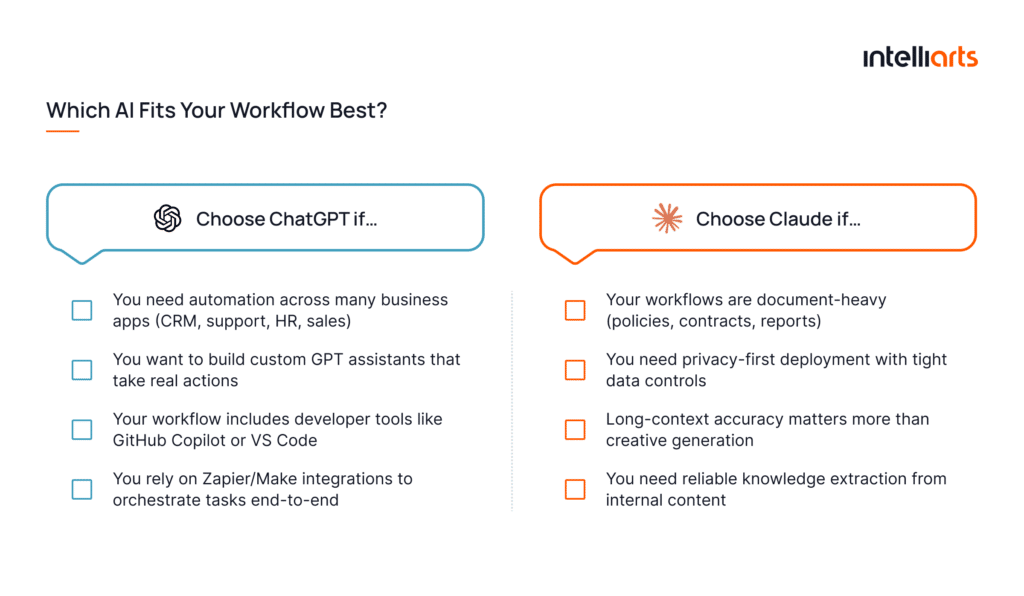
ChatGPT integrates deeply across business applications, offering one of the most extensive automation ecosystems on the market. The AI assistant:
- Allows users to build and deploy custom “GPTs”, i.e., specialized assistants, which can call APIs and access company tools
- Can be connected via platforms like Zapier or Make to hundreds of workplace apps. So users will benefit from automated workflows in Docs, Sheets, CRM platforms, ticketing systems, etc.
- Has a large plugin ecosystem for web search, browsing, analytics, workflows
- Supports strong developer ecosystem, including GitHub Copilot and VS Code assistants
Example workflows
- Auto-generate email & CRM updates from inbound leads
- Automatically categorize and summarize support tickets
- Convert spreadsheet data into insights and push notifications to team
How is Claude different from ChatGPT? Claude focuses on more secure, document-driven workflows inside enterprise systems. This AI tool:
- Supports Tool Use for controlled API interactions and safe agent actions
- Integrates directly with Google Workspace, Slack, and via AWS Bedrock so Claude can interact with your enterprise content without compromising data privacy
- Supports Claude Code for technical workflows, including code generation and execution
- Performs well in long-document analysis, knowledge extraction, internal policy navigation, and compliance automation
Example workflows
- Scan contracts to extract risks and upload findings to internal systems
- Read policy docs to generate compliance summaries
- Classify documents and add them to secure repositories automatically
Enterprise and compliance
One more key difference between Claude and ChatGPT at the enterprise level lies in how each platform approaches compliance and data governance. These factors are especially critical in highly regulated industries, such as legal, banking, energy and utilities, or public sector.
Consider the core areas in detail:
- Data privacy and retention: For personal use (ChatGPT Plus, Pro, or Free), there is default data sharing. On Business and Enterprise, ChatGPT states that it doesn’t train models on user data by default. Claude’s policy is no different. The policy has changed since September 2025, as earlier Anthropic was against training on user data by default.
- Security certifications and external audits: OpenAI claims alignment with ISO 27001, 27017, 27018, and 27701, and SOC 2 Type 2 compliance for enterprise customers. Anthropic aligns with CSA STAR, ISO 27001/27017/27018, and SOC 2 Type 2 certificates. At the same time, it’s better to request the actual audit reports or certificates for the specific model version you plan to use.
- Identity, access, and activity controls: Business plans in ChatGPT support SAML SSO, domain‐bound access, role‐based user permissions, audit logs, and usage analytics for teams. Similarly, Claude offers SSO (SCIM), role‐based access controls, domain capture, audit logs, and compliance API for high‐security deployments.
- Deployment options: ChatGPT is available as SaaS (OpenAI cloud). Also, its business accounts support dedicated infrastructure, custom deployments, and region-specific availability. As for Claude, it’s available via public API but, as mentioned, also integrated into AWS Bedrock and Google Vertex AI. The latter offer VPC, private endpoints, and region‐specific deployments.
UX and day-to-day experience
In everyday use, the difference between a model that simply answers and one that truly assists often comes down to three UX factors: speed and latency, UI ergonomics and prompt tooling, and voice/chat personality.
Speed and latency
Fast response time is vital for user satisfaction. Claude Haiku 4.5 was specifically built for customer service bots and low latency applications, where response time matters the most. As for ChatGPT, it offers documentation on latency optimization, such as time to first token or streaming. Along with helping to optimize speed, it also explains how it depends on prompt size, model choice, and infrastructure.
UI ergonomics and prompt tooling
User day-to-day experience also largely relates to how easy it is to use the OpenAI agent and how well the interface supports efficient workflows. ChatGPT continues to invest in prompt-tooling ergonomics by developing the “projects” feature, custom GPTs, memory control, and the visual prompt editor.
In contrast, Claude is more focused on long-context sessions, document uploads and tool integrations, and interface guidance on latency tuning.
Voice/chat personalities
The “feel” of the interaction also influences adoption and satisfaction. ChatGPT users mostly refer to its multimodal capabilities and conversational tone. The latter is especially helpful in marketing and support settings.
Claude takes a calmer, more professional tone suited for enterprise contexts. It’s usually less prone to informal or “creative” chat modes.
Claude vs ChatGPT: Which should you choose?
So… is Claude actually better than ChatGPT? Or is ChatGPT better than Claude? Neither. Choosing between Claude vs ChatGPT ultimately comes down to which strengths matter most for your business, whether it’s safety, multimodality, or specific use cases.
If you prioritize coding velocity
Choose ChatGPT as it speeds up development loops and supports developers where they already work. The tool:
- Integrates well into developer workflows (GitHub Copilot, VS Code, CLI agents)
- Shows strong performance on practical coding tasks and debugging
- Helps with faster prototyping for engineering teams
If you need brand-safe writing
Select Claude, which is preferred for legal, compliance, and policy-aligned editorial tasks. The AI agent:
- Remains a more consistent tone for regulated and professional contexts
- Proves strong contextual grounding from long compliant materials
- Shows low hallucination rates in official document generation
At the same time, ChatGPT can be useful for more creative writing tasks.
If you care about multimodal/image generation
Go for ChatGPT, which offers richer formats and media-driven UX. ChatGPT:
- Has full multimodal capabilities (text, image, audio, video via Sora)
- Offers more expressive conversational and voice modes
If you’re an enterprise with strict compliance
Obviously, Claude. The AI agent aligns closely with internal data governance and audit requirements. Plus, it:
- Has strong access governance and private deployment via AWS/Google Vertex
- Is more suitable for risk-sensitive sectors
If you want the largest ecosystem/extensions
ChatGPT might be a better choice as an automation hub across business systems. The AI tool:
- Has a vast plugin and automation ecosystem
- Offers custom GPTs that extend capabilities to any internal workflow
- Is more flexible for operational scaling
How to choose between Claude and ChatGPT for business: Our team’s insights
Disclaimer: At Intelliarts, we don’t utilize Gen AI in our customers’ projects unless otherwise discussed. Even on such occasions, Gen AI is utilized purely for some minor process automation purposes and never for actual coding.
However, our experience using Gen AI models on research and development projects, intended to validate certain assumptions and test particular technologies, allows us to share some insights. For example, we explored the approaches and benefits of using ChatGPT for data extraction tasks in one of our research projects.
And if you’re looking for ways to connect AI technology with your actual business objectives, read how to use AI proof of concept in another of our blog posts.
From a technical perspective, it’s possible to compare different models of Claude vs ChatGPT 4 and ChatGPT 3.5 by specific benchmarks. The results of such a comparison are shown in the table below:
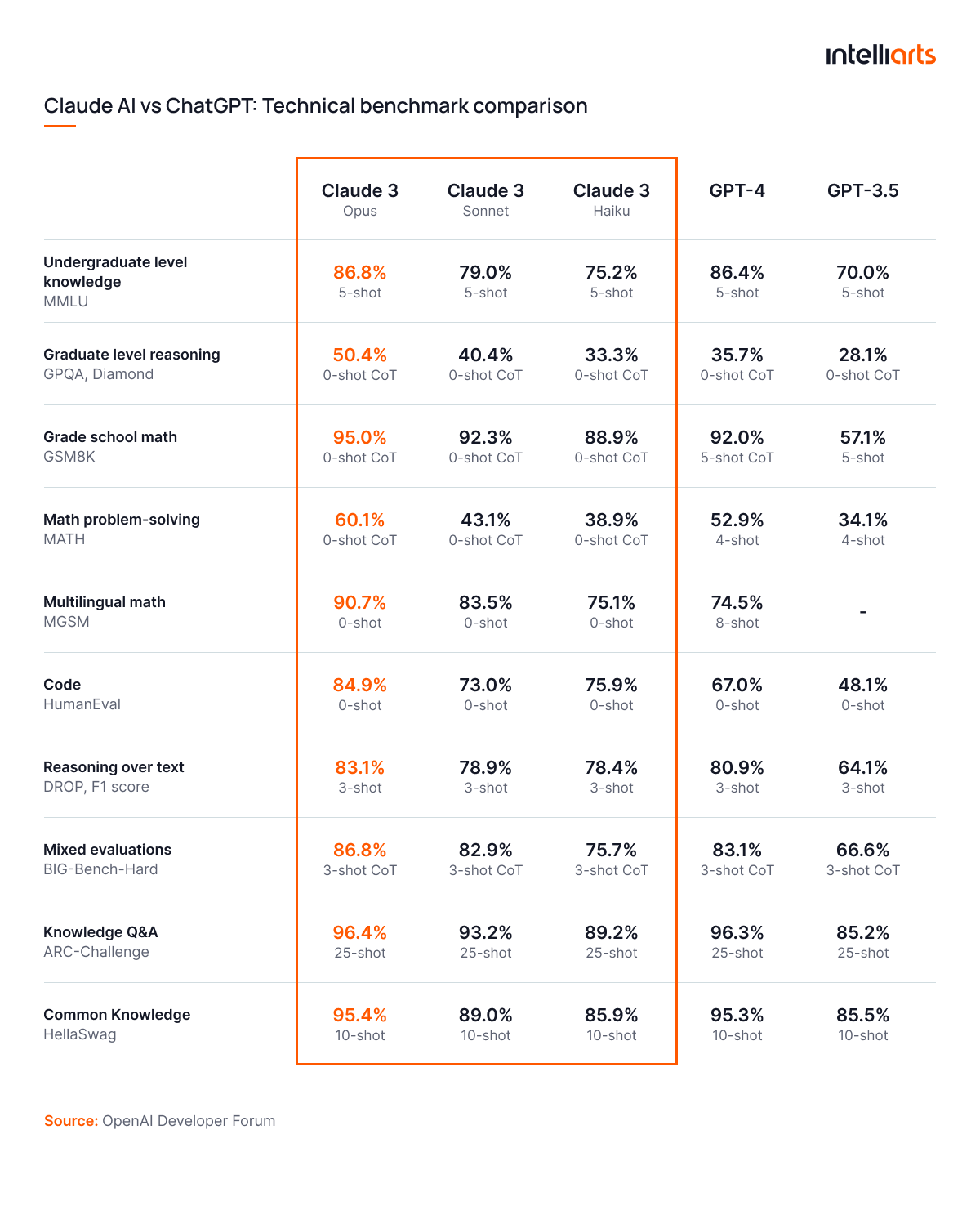
Basically, based on the benchmarks, Claude outperforms ChatGPT on any code and logic tests. However, for coding and programming, which is better, ChatGPT or Claude? ChatGPT generally shows great results in tasks like code generation, debugging, and handling specific programming queries.
In practice, the difference in performance between the highest-performing Claude and GPT models is less notable in coding-related benchmarks, but ChatGPT tends to be more adaptable for programming tasks due to its broader and more user-friendly support in development environments. Moreover, both Gen AI are being improved rapidly, so in the near future, the situation may change.
Our experience shows that you can rely on Claude AI on the following matters:
- Data-intensive tasks. Since ChatGPT is much more limited in its maximum token size, there is no other choice but Claude AI for processing intensive data.
- Processing specialized niche reports. Claude AI is less prone to errors and inaccuracies. Combined with, once again, a larger token limit, it makes Claude AI a far better choice for any report summarization or generation-related tasks.
Should we need to use AI for working processes, ChatGPT would be our choice in the following scenarios:
- All forms of assistance to customers. Claude AI is not a user-friendly AI. It’s suited more to industry professionals rather than for assisting regular users. It’s because of the way it processes and outputs information. At the same time, ChatGPT excels here.
- Code assistance. Frankly enough, ChatGPT happens to find solutions to some minor development-related issues more effectively and with less prompt engineering effort needed. It’s also easier to use when it’s needed to modify some data, as it’s less likely to misunderstand such a request.
- Creative task assistance. For tasks like generating marketing ideas, creating social media content, or drafting blog posts, ChatGPT proves to be more effective. Its ability to generate creative text and engage in brainstorming sessions makes it a more suitable tool for industries focusing on content creation and innovation.
Additionally, both models work well with extracting info from documents or finding discrepancies between them. Besides, Claude AI features vs ChatGPT shows that simple automation tasks, like transferring documents to different storages based on their titles, are flawlessly executed by both AI on most occasions.
Explore the potential of LLMs for your business
Let Intelliarts guide you with expert consultation
Contact Us
Setup guides
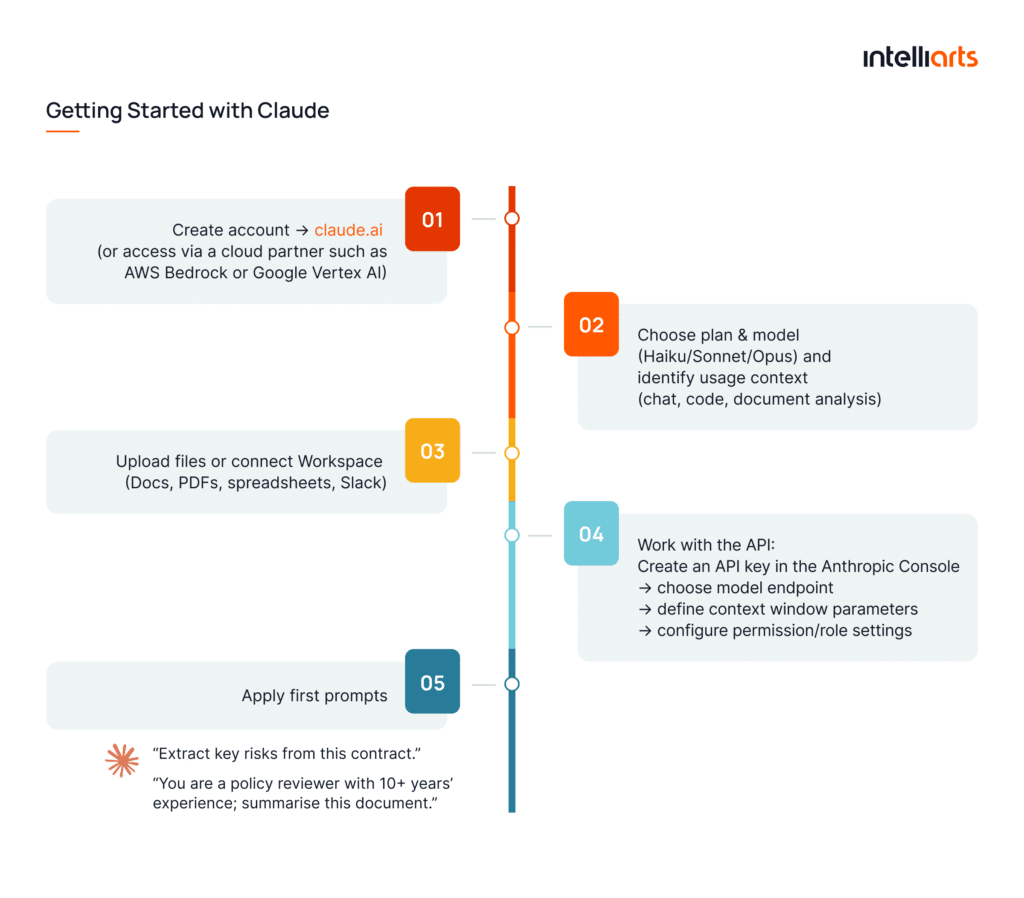
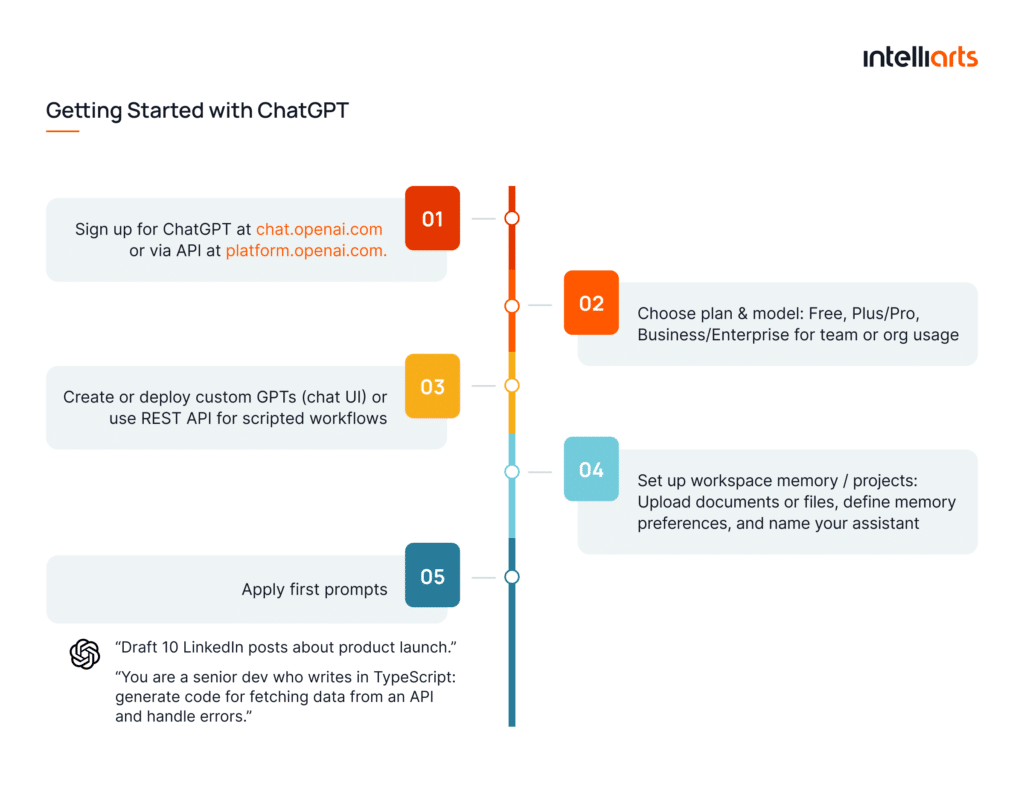
Below are straightforward steps and best-practices to get started with both platforms.
Getting started with Claude
Getting started with ChatGPT
Prompting patterns and reusable templates
To make it easier for you, here are some prompt ideas to get you started:
- Role-based prompts: “You are a trained analyst, summarize the data.”
- Action-oriented templates: “List the top five risks, rank them, and provide mitigation steps.”
- Chunk-and-synthesize: For long documents: upload in chunks → ask for summaries → combine into final output.
- Interactive chains: “Ask follow-up questions based on the previous answer unless you’re ready to produce a final summary.”
- Safety reminders: “Ensure your output does not include private or sensitive user data. Cite your sources.”
Alternatives to consider
While ChatGPT and Claude covers the majority of enterprise needs, there are other players and approaches worth mentioning:
- Gemini by Google DeepMind — Strong in multimodal reasoning and large-scale generative workflows; fully integrated with Google Cloud services, what makes it a great alternative for teams deeply embedded in the Google ecosystem
- Perplexity by Perplexity AI, Inc — An AI platform that blends retrieval-augmented results with conversational interaction; ideal for enterprises focused on knowledge-worker search and research assistance
- Open-source options — Models such as Llama 3, Falcon, and platforms like Open‑Assistant provide full control, on-premises deployment, and customizability. They’re ideal if you have internal ML expertise, strong governance needs, or require full transparency and cost control
Final take
The key considerations for choosing between Claude and ChatGPT for projects bring us to final insights. Claude AI is more suited for data-heavy, document-based tasks as well as analytics. At the same time, ChatGPT is more commonly employed for creating problem-solving and in all sorts of solutions that interact with customers. Keeping that in mind, choosing between these two models for your particular process or project should be more straightforward and should easily address your questions like is Claude AI better than ChatGPT or vice versa.
Here at Intelliarts, with more than 24 years of experience and dozens of successful case studies under our belt, our AI/ML and big data experts can help you with an AI-based solution of any complexity. From business and high-tech advisory to end-to-end development execution, we can offer it all and cover any of your business needs.
FAQ
Can you provide concrete examples of when to choose Claude over ChatGPT and vice versa?
Claude AI is ideal for tasks involving large document processing, data research, and analysis. It excels in handling complex documents, providing detailed summaries, and synthesizing data from financial, legal, or regulatory reports, making it perfect for industries requiring high-level data accuracy and comprehension. At the same time, ChatGPT is the better choice for creative tasks, brainstorming, code generation, and providing user-friendly outputs. It’s especially suited for customer-facing interactions, content creation, and generating conversational experiences, making it ideal for marketing, customer support, and technical tasks that require ease of use. In terms of how accurate Claude vs. GPT is, both provide more or less accurate results, depending on the task.
Can both Claude AI and ChatGPT be integrated into a single application?
Claude AI and ChatGPT can indeed be integrated into a single application, offering flexibility by leveraging the strengths of both models. This allows businesses to switch between Claude AI and ChatGPT depending on the complexity and nature of the task. The integration ensures a well-rounded solution by utilizing the unique capabilities of both Claude AI and ChatGPT models.
How does the cost change when choosing ChatGPT or Claude?
The cost of Claude vs. ChatGPT-4 depends on the pricing models of each service. ChatGPT often comes at a more competitive rate, especially with its token-based pricing structure, while Claude AI may have variable pricing based on advanced features. Understanding the differences between Claude AI and ChatGPT can guide decisions based on the budget and required features.








![Top MLOps Tools in 2026 and Their ROI [Based on Real Projects]](https://intelliarts.com/wp-content/uploads/2026/08/ChatGPT-Image-23-июн.-2026-г.-11_16_54-1.webp)